<?xml version="1.0" encoding="utf-8"?><feed xmlns="http://www.w3.org/2005/Atom" xml:lang="en"><generator uri="https://jekyllrb.com/" version="4.4.1">Jekyll</generator><link href="https://juan.pallares.me/feed.xml" rel="self" type="application/atom+xml" /><link href="https://juan.pallares.me/" rel="alternate" type="text/html" hreflang="en" /><updated>2025-08-11T09:28:13+02:00</updated><id>https://juan.pallares.me/feed.xml</id><title type="html">Juan Pallarès Garbí</title><subtitle>Juan Pallarès blog. Kaizen.</subtitle><author><name>Juan Pallarès</name><email>juan@pallares.me</email></author><entry xml:lang="es"><title type="html">Calculadora de hipoteca</title><link href="https://juan.pallares.me/calculadora-de-hipoteca/" rel="alternate" type="text/html" title="Calculadora de hipoteca" /><published>2023-02-19T00:00:00+01:00</published><updated>2023-02-19T00:00:00+01:00</updated><id>https://juan.pallares.me/calculadora-de-hipoteca</id><content type="html" xml:base="https://juan.pallares.me/calculadora-de-hipoteca/"><![CDATA[<h2 id="introducción">Introducción</h2>

<p>Tengo la manía tonta de querer entender mejor las cosas que me afectan. Después de sumergirme en el <a href="https://juan.pallares.me/calculadora-de-sueldo-neto/">cálculo del sueldo neto</a>, con su correspondiente <a href="https://tecalculo.com/calculadora-de-sueldo-neto">calculadora</a>, la cúal nunca esta lo suficientemente actualizada como bien se encargan de recordarme cada vez que hago algo de SPAM. Estos últimos meses he estado trabajando en una calculadora de la cuota mensual de la hipoteca. O en corto, que tiene mejor SEO:</p>

<p>🏠 <a href="https://tecalculo.com/calculadora-de-hipoteca">Calculadora de hipoteca</a>.</p>

<p>Tengo una hipoteca desde hace un año y medio y es todo un mundo. Cuando empecé a buscar bancos y preguntar a amigos te das cuenta de los mitos y creencias. Los que más me sorprendieron fueron:</p>

<h3 id="los-variablelivers">Los “variablelivers”</h3>

<p>En el momento que contraté la hipoteca, los tipos estaban por los suelos y llevaban años así. Se podían conseguir hipotecas tipo fijo a 1 y pico % de interés. Pues aún así muchos amigos me recomendaban variable. Los variablelivers decían su mantra: “¡El euríbor no va a subir!”. Que rápido se les ha complicado la cosa…</p>

<p><strong>Valor histórico del euríbor</strong></p>

<table>
  <tbody>
    <tr>
      <td>Año</td>
      <td>Valor</td>
    </tr>
    <tr>
      <td>2022</td>
      <td>3,018%</td>
    </tr>
    <tr>
      <td>2021</td>
      <td>-0,487%</td>
    </tr>
    <tr>
      <td>2020</td>
      <td>-0,481%</td>
    </tr>
    <tr>
      <td>2019</td>
      <td>-0,272%</td>
    </tr>
    <tr>
      <td>2018</td>
      <td>-0,147%</td>
    </tr>
    <tr>
      <td>2017</td>
      <td>-0,189%</td>
    </tr>
  </tbody>
</table>

<h3 id="amortiza-siempre">Amortiza siempre!</h3>

<p>Otra fauna muy común, tiene un mandamiento que pregonan: “¡En cuanto ahorres algo amortiza!” “¡Tienes que quitarte el préstamo cuánto antes!”. A ver, no siempre. Y para muestra mi propio caso. Mi hipoteca es 1,6% tipo fijo. Mientras escribo estas líneas hay dépositos al 2%. Gano 0,4% anual sin riesgo. ¿Amortizo? ¿De verdad? luego esta la inflación, todo será más caro dentro de 30 años, también cobraré más (espero) pero, ¿la cuota mensual? será la misma. <strong>Al final lo de amortizar es sencillo, si tienes el dinero muerto del asco en la cuenta, amortiza. Si le sacas mejor rendimiento que los intereses de tu hipoteca, no amortices.</strong></p>

<h3 id="los-que-tienen-un-tipo-bajísimo-maestros-negociadores">Los que tienen un tipo bajísimo. Maestros negociadores.</h3>

<p>Finalmente, también me encontré alguno que tenía tipos muy muy bajos y yo sorprendido, ¿cómo lo habrán conseguido? A la que rascas un poco se descubre el pastel. Tenían contratado con el banco hasta ¡la alarma de la casa! Seguro de casa, alarma, seguro de vida, seguro de pagos, ¿quién da más? y estos seguros metidos en la deuda total, para cobrar sus buenos intereses también sobre ellos. El coste real de la hipoteca mes a mes era muy diferente al de contabilizar solo el tipo de interés. Hablaré de eso más adelante pero spoiler: los seguros que ofrece el banco son más caros y peores (combo).</p>

<p>Sea como sea, si lo que te comento te suena a chino, quédate y intento resolver tus dudas. Abre la <a href="https://tecalculo.com/calculadora-de-hipoteca">calculadora de hipoteca</a> en otra pestaña del navegador y ve jugando.</p>

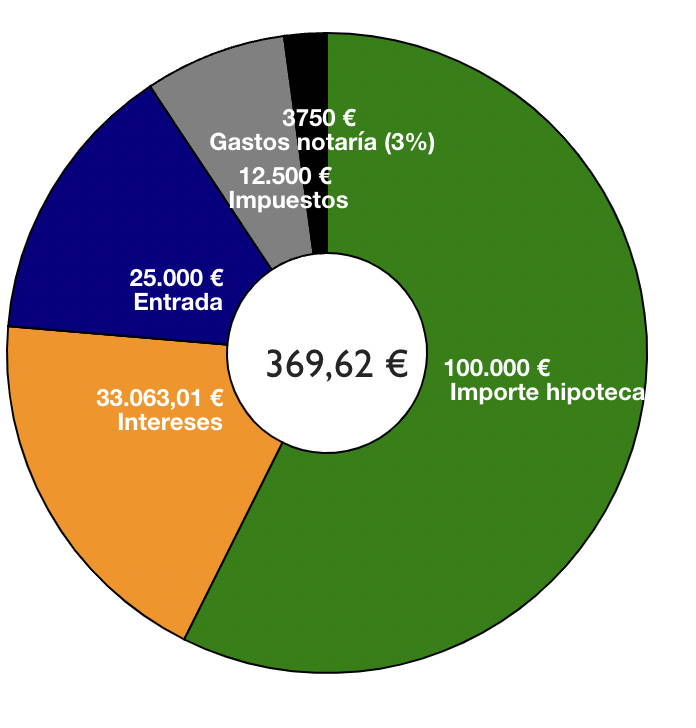
<p><img src="/images/diferentes-gastos-hipoteca.png" alt="Diferentes gastos de la hipoteca" /></p>

<h2 id="prestamo-francés-">Prestamo francés 🇫🇷</h2>

<p>Las hipotecas en España son del tipo préstamo francés. La gracia de este tipo de préstamo es que las cuotas son las mismas durante toda la vida del préstamo, lo que ayuda a evitar imprevistos etc. Eso los ha hecho los más comunes. Esto me lleva a otro mito muy extendido. “En las hipotecas se pagan muchos más intereses al principio que al final” y bueno si es cierto que se paga más pero el único motivo es porque debes más! Si la cuota siempre es la misma y tú al banco al inicio le debes TODO es normal que pagues más intereses, vamos con un ejemplo para entenderlo mejor.</p>

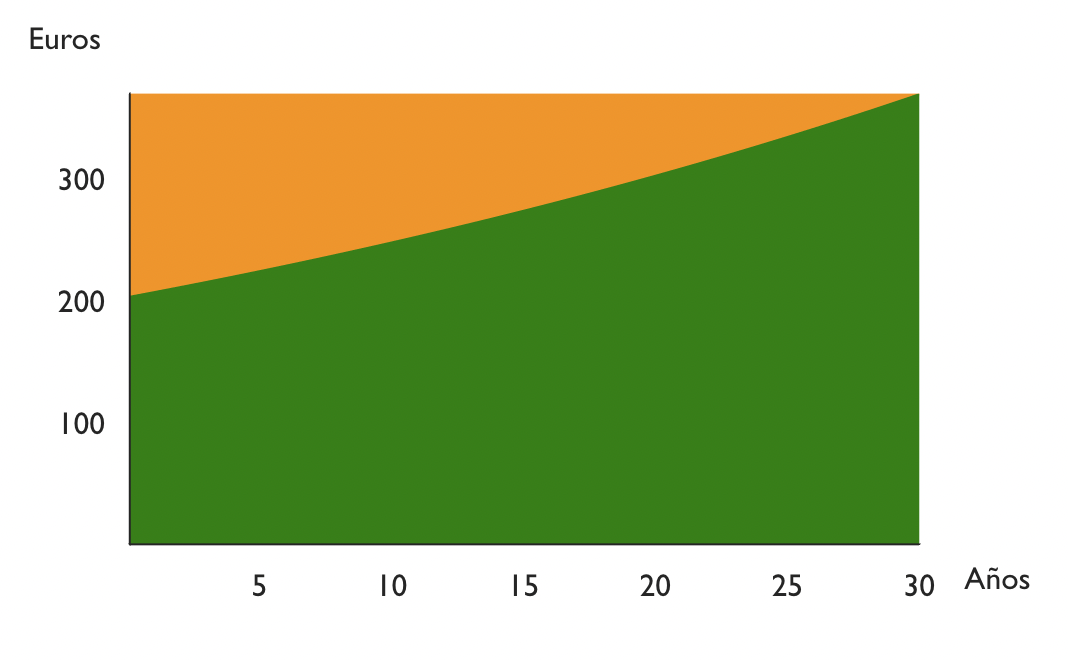
<p><img src="/images/amortizacionChart.png" alt="Cuadro de amortizacion" /></p>

<p>Imagina un préstamo de 100.000 a 10 años, con un interés del 1%. Números redondos para facilitar cálculos. Los intereses son anuales así que el primer año le tienes que pagar al banco el 1% de 100.000€. Es decir 1000€ euros. Dividido entre 12 meses, 83,3€ mensuales. El resto de cuota es la deuda que la vas reduciendo, en este caso 876,04€ - 83,3€ = 792,74€ mensuales. 9512,88€ anuales.</p>

<p>Ahora vamos al año dos. La deuda es ahora el resultado de restar la dueda inicial menos lo pagado el primer año, es decir 100.000€ - 9512,88€ = 90.487,12€. <strong>Los intereses del segundo año son entonces el 1% de esa cifra, es decir 904,87€. Cada mes solo 75,41€. Ha bajado unos 8 euros con respecto al año anterior (83,3€)</strong>. ¿Se ve la tendencia? Cada año pagas menos intereses porque vas reduciendo tu deuda.</p>

<h2 id="la-entrada">La entrada</h2>

<p>Por norma general, el banco te va a dar una hipoteca de como máximo el 80% del valor de la vivienda. Este valor se obtiene mediante tasación. Si el precio de venta es menor al de tasación se usará ese valor. Siempre el mínimo de esos valores (venta o tasación). Además el 80% se da si es tu primera vivienda, donde te vas a empadronar. Para una segunda vivienda el máximo valor de la hipoteca es 70%.</p>

<h2 id="tipo-fijo-variable-o-mixto">Tipo fijo, variable o mixto</h2>

<p>Cuando contratas la hipoteca puedes escoger tipo fijo o variable (mixto es una mezcla de ambos). Tipo fijo, como el nombre indica, se decide al inicio del préstamo y ya no cambia más. Solo puede cambiar si tienes bonificaciones por domiciliar nómina, etc. y dejas de cumplirlas.</p>

<p>Tipo variable depende del famoso euríbor. No voy a entrar al detalle de que es el euríbor, pero tomalo como un índice de referencia que puede subir o bajar y los intereses de tu hipoteca dependerán de ello. Por ejemplo imagina que tienes una hipoteca que tus intereses son “euríbor + 0,5%”. Pues si el euríbor esta a 3%, tu intereses anuales serán 3,5%. Normalmente se recalculan los intereses cada 6 meses o cada año.</p>

<p>La pregunta del millón, ¿cuál es mejor? la respuesta depende del contexto económico general y de tu caso particular. De antemano nadie sabe cual va a ser mejor así que toca un buscar el riesgo de la variable o a tranquilidad de la fija. Piensa además que puedes cambiar la hipoteca a otro banco durante el préstamo. Imagina que contratas una hipoteca a un tipo fijo alto y luego baja mucho el euríbor. Los bancos empezarán a ofertar hipotecas con mejores condiciones que la tuya, puedes cambiar. Se le llama subrogar. También es probable que si tu banco le enseñas que te vas te mejore las condiciones.</p>

<h2 id="impuestos-por-compra-de-vivienda-iva-o-itp">Impuestos por compra de vivienda IVA o ITP</h2>

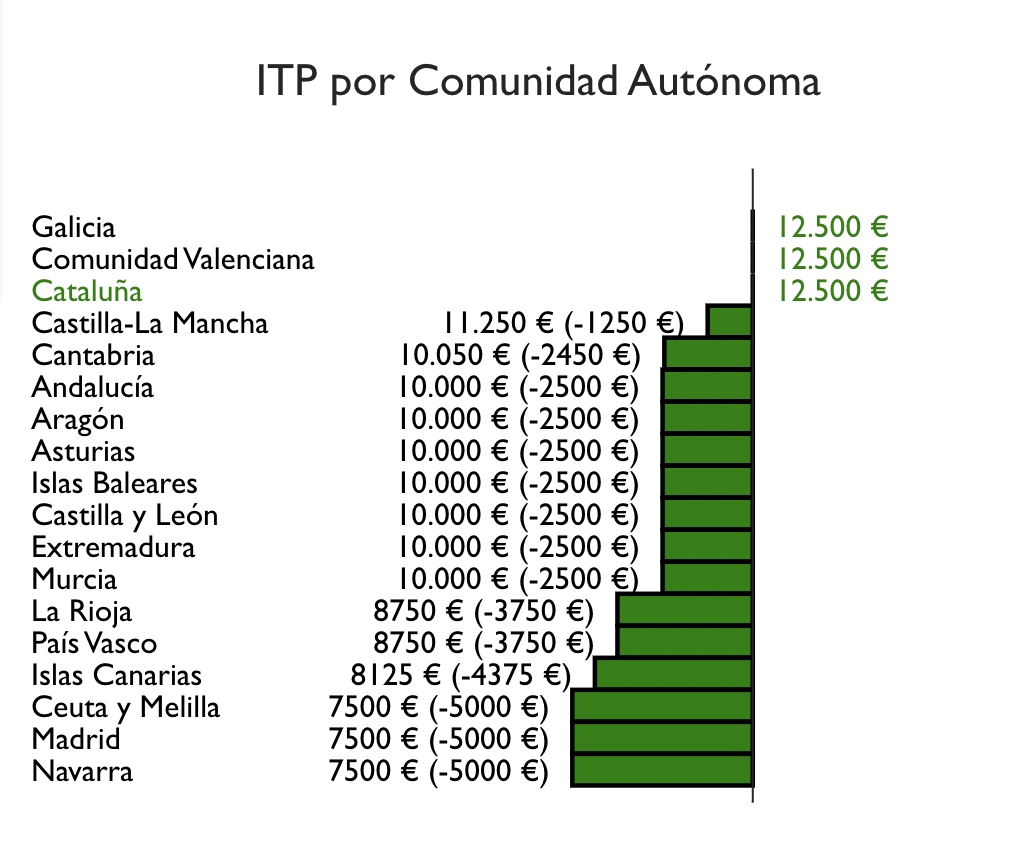
<p>Dos cosas hay seguras en la vida, la muerte y los impuestos. ¿Que pensabas que no pagarías impuestos por comprar una vivienda? Pues claro que sí y no pocos. Si la vivienda es nueva es fácil, es una 10% de IVA. Si la vivienda es de segunda mano ya se complica la cosa. Como con el IRPF cada comunidad hace y deshace a su antojo y vuelve a ganar Madrid con solo un 5%. Muestro una comparativa por comunidad y los impuestos de todas las comunidades en un tab de la calculadora.</p>

<p><img src="/images/ITP-por-comunidad.png" alt="ITP por comunidad" /></p>

<h2 id="notaría-y-otros-gastos">Notaría y otros gastos</h2>

<p>Finalmente, hay gastos de notaría, gastos de la inmobiliaria si usas una, etc. Es muy difícil estimar porque depende mucho del caso. En la calculadora he puesto un 3%.</p>

<h2 id="seguros-de-saludos-vida-extras-compara-bien">Seguros de saludos, vida, extras, compara bien</h2>

<p>Hasta aquí hemos visto los gastos obligatorios. Pero el banco siempre quiere más. Al ganar tan “poco” con la hipoteca buscan colocarte varios seguros. Estos seguros te bonifican y te bajan tu tipo de interés. Hay que hacer números, no os precipiteis y calculad si vale la pena. En la mayoría de ocasiones es mejor contratar los seguros (si los necesitas) por tu cuenta. El único seguro obligartorio es el de la casa, ninguno más. En mi caso, me obligaron a contratar el seguro de casa el primer año con ellos. Al año siguiente lo dí de baja y conseguí un mejor seguro con más de 100 euros de ahorro. Repite conmigo, hipotecas en bancos, seguros en aseguradoras.</p>

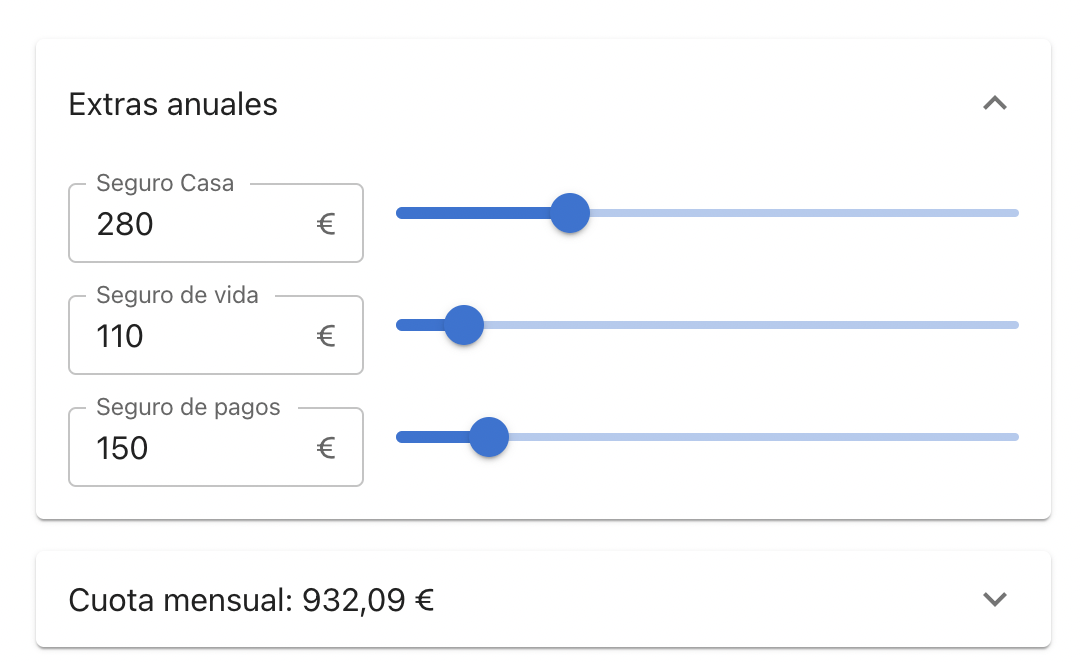
<p>Lo que estoy seguro que no vale la pena nunca es poner los gastos de los seguros de todos los años dentro del préstamo de la hipoteca. Vas a pagar unos intereses inecesarios. Para facilitar los cálculos te pongo este apartado en la calculadora donde puedes ver como afectan la cuota mensual estos seguros extras.</p>

<p><img src="/images/gastos-extras.png" alt="Calcular gastos extras" /></p>

<h2 id="amortizar">Amortizar</h2>

<p>Amortizar es adelantar pago de tu deuda para que esta sea menor. Hay dos tipos de amortización. Una opción reduce la duración del préstamo (menos meses) y la otra opción reduce la cuota mensual. La opción con la que se ahorran más inteses es con la de reducir duración del préstamo pero va a gustos. Quizá interesa reducir una cuota muy alta que nos lleva ahogados. En la <a href="https://tecalculo.com/calculadora-de-hipoteca">calculadora</a> se pueden comparar ambas opciones</p>

<p><img src="/images/calculo-amortizacion.png" alt="Cálculo de amortización" /></p>

<h2 id="conclusión">Conclusión</h2>

<p>Hasta aquí esta breve introducción a la hipoteca. Es posiblemente el préstamo más importante que contrata una persona en su vida, que menos que entenderlo bien.</p>]]></content><author><name>Juan Pallarès</name><email>juan@pallares.me</email></author><category term="calculadora" /><category term="hipoteca" /><category term="cuota" /><category term="intereses" /><category term="fija" /><category term="variable" /><category term="euribor" /><category term="prestamo" /><category term="frances" /><category term="amortizar" /><category term="ITP" /><category term="IVA" /><summary type="html"><![CDATA[Resuelve todas las dudas de la hipoteca que nunca te atreviste a preguntar]]></summary></entry><entry xml:lang="es"><title type="html">Lo mejores libros y entradas del blog de 2022</title><link href="https://juan.pallares.me/los-mejores-libros-y-entradas-del-blog-de-2022/" rel="alternate" type="text/html" title="Lo mejores libros y entradas del blog de 2022" /><published>2023-01-08T00:00:00+01:00</published><updated>2023-01-08T00:00:00+01:00</updated><id>https://juan.pallares.me/los-mejores-libros-y-entradas-del-blog-de-2022</id><content type="html" xml:base="https://juan.pallares.me/los-mejores-libros-y-entradas-del-blog-de-2022/"><![CDATA[<p>Un año más con el blog relativamente activo (6 nuevas entradas y 1 actualizada). 2022 ha sido el año que he comprado el dominio <a href="https://tecalculo.com/es">tecalculo.com</a> y le he dedicado mucho tiempo a ambas calculadoras (<a href="https://tecalculo.com/calculadora-de-sueldo-neto">salario</a> e <a href="https://tecalculo.com/en/mortgage-calculator">hipoteca</a>). Os debo un entrada sobre la <a href="https://tecalculo.com/en/mortgage-calculator">calculadora de hipoteca</a> pero quiero hacer aún unos últimos retoques. Ese tiempo del pet project tecalculo me ha quitado tiempo de escribir en el blog y también de lectura. También he tenido un cambio de trabajo y eso siempre quita tiempo y altera rutinas. Sin más introducción, vamos al lío.</p>

<h1 id="lectura-">Lectura 📖</h1>

<p><a href="https://juan.pallares.me/books/">Este año he combinado libros técnicos y novelas/no ténicos y haré dos podiums</a>. He leído 3 libros técnicos, 1 lo he dejado y 2 los tengo en progreso. Novelas he leído 6 para un total de 9 libros. También he dejado una a medias y tengo otra por la mitad.</p>

<h2 id="los-mejores-libros-no-técnicos-del-año">Los mejores libros no técnicos del año</h2>

<ol>
  <li>
    <p>Claramente el que más me ha gustado ha sido <a href="https://juan.pallares.me/books/roma-soy-yo/">Roma soy yo</a>. No es la primera novela que leo de Posteguillo pero es que si además trata de una personaje como Julio César…mi único problema es tener que esperar al siguiente de la saga, este solo trata de su juventud.</p>
  </li>
  <li>Para el segundo puesto, me quedo con <a href="https://juan.pallares.me/books/fuera-de-serie/">Fueras de serie de Malcolm Gladwell</a>. Desmitifica a la gente de éxito y argumenta las diferentes causas que llevan al éxito más allá de “es un elegido”. Un par de citas:
    <blockquote>
      <p>en cualquier equipo de la elite del hockey —la flor y nata—, el 40 por ciento de los jugadores habrá nacido entre enero y marzo; el 30 por ciento, entre abril y junio; el 20 por ciento, entre julio y septiembre; y el 10 por ciento, entre octubre y diciembre.</p>
    </blockquote>

    <blockquote>
      <p>Sus investigaciones sugieren que una vez que un músico ha demostrado capacidad suficiente para ingresar en una academia superior de música, lo que distingue a un intérprete virtuoso de otro mediocre es el esfuerzo que cada uno dedica a practicar. Y eso no es todo: los que están en la misma cumbre no es que trabajen un poco o bastante más que todos los demás. Trabajan mucho… mucho más.</p>
    </blockquote>
  </li>
  <li>Para la tercera posición no me atrevo a destacar uno por encima del resto. He disfrutado mucho <a href="https://juan.pallares.me/books/dios-no-es-bueno/">Dios no es bueno</a> pero soy público fácil como ateo convencido. <a href="https://juan.pallares.me/books/21-lecciones-para-el-siglo-xxi/">21 lecciones para el siglo XXI</a> esta muy bien pero es que Sapiens me gustó tanto que comparo y pierde. De la <a href="https://juan.pallares.me/books/trilogia-de-la-fundacion/">Trilogía de la fundación</a> casi me bajo pero me recomendaron esperar al Mulo y fue un gran consejo. Por último, el <a href="https://juan.pallares.me/books/el-triunfo-del-dinero/">Triunfo del dinero</a> empieza fuerte e interesante pero luego conforme avance se me hizo más pesado.</li>
</ol>

<p>La decepción del año me la llevé con <a href="https://juan.pallares.me/books/toda-la-verdad/">Toda la verdad - Mike Tyson</a>. Una vida tan potente muy mal explicada y con poco detalle para mi gusto. Lo dejé muy a mi pesar. Ojalá hiciera una el mismo autor que la de Agassi.</p>

<h2 id="los-mejores-libros-técnico-del-año">Los mejores libros técnico del año</h2>

<ol>
  <li>
    <p>Como mejor libro técnico me quedo con <a href="https://juan.pallares.me/books/the-art-of-unit-testing-2nd-edition/">The Art of Unit Testing de Roy Osherove</a>. Ya escribí <a href="https://juan.pallares.me/the-art-of-unit-testing/">una entrada sobre los aprendizajes</a>.</p>
  </li>
  <li>
    <p>Seguido de cerca pondría <a href="https://juan.pallares.me/books/the-pragmatic-programmer-your-journey-to-mastery-20th-anniversary-edition-by-andrew-hunt-david-hurst-thomas/">The pragmatic Programmer</a> el cual es un clásico y ya tardaba en leerlo. Enseñanzas muy buenas aunque me parecieron prepotentes por momentos.</p>
  </li>
</ol>

<p><a href="https://juan.pallares.me/books/monolith-to-microservices/">Monolith to Microservices</a> me gustó pero creo que es útil cuando estas en ese momento migrando un monolito a microservicios que no es mi caso. Por último, <a href="https://juan.pallares.me/books/working-effectively-with-legacy-code/">Working Effectively with Legacy Code</a> lo abandoné porque no estoy trantando con código tan legacy actualmente que lo necesite.</p>

<h2 id="los-mejores-blogs">Los mejores blogs</h2>

<p>Sigo leyendo la misma base de <a href="https://juan.pallares.me/los-mejores-libros-y-blogs-de-2021/#los-mejores-blogs-y-entradas">blogs que os comenté el año pasado</a>. Los artículos que más me han hecho pensar sin duda son <a href="https://collabfund.com/blog/authors/morgan/">los de Morgan Housel</a>. Os recomiendo TODOS pero si tengo que escoger solo uno, es <a href="https://collabfund.com/blog/think/">How People Think</a>.</p>

<h1 id="estadísticas-del-blog-">Estadísticas del Blog 🏆</h1>

<p><a href="https://juan.pallares.me/balance-2020/">2020</a> 17 entradas, <a href="https://juan.pallares.me/los-mejores-libros-y-blogs-de-2021/">2021</a> 8 y 2022 6 + 1. Vamos a ver lo más visto</p>

<h2 id="las-entradas-más-vistas">Las entradas más vistas</h2>

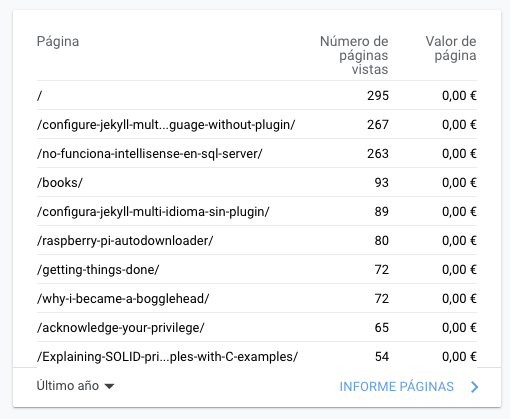
<p>2020:</p>

<p><img src="/images/mostVisitedPages.png" alt="Most visited pages 2020" /></p>

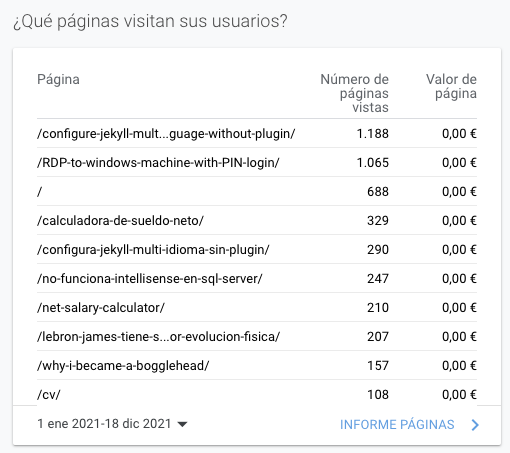
<p>2021:</p>

<p><img src="/images/mostVisitedPages2021.png" alt="Most visited pages 2021" /></p>

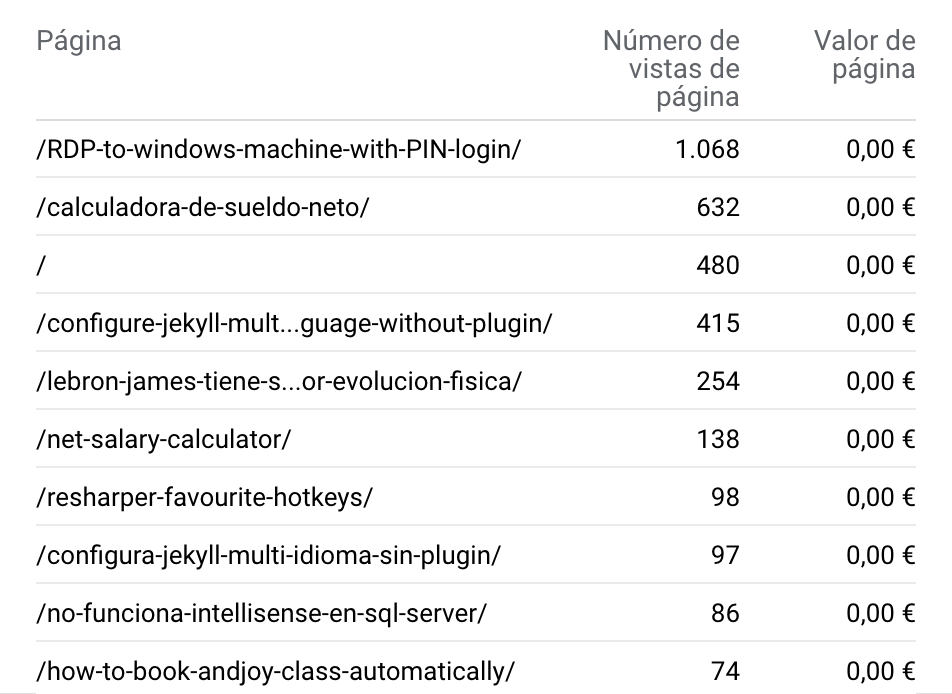
<p>2022:</p>

<p><img src="/images/mostVisitedPages2022.png" alt="Most visited pages 2022" /></p>

<ol>
  <li>Increíble que <a href="https://juan.pallares.me/RDP-to-windows-machine-with-PIN-login/">RDP to Windows machine with PIN login</a> haya conquestado el primer puesto, no afloja prácticamente las mismas visitas que el año pasado y con el segundo a 400 visitas de distancia.</li>
  <li>La explicación sobre el <a href="https://juan.pallares.me/calculadora-de-sueldo-neto/">cálculo del IRPF y la calculadora de sueldo neto</a> es comprensible que ocupe los primeros puestos. Es una entrada que he actualizado durante el año para mejorarla y corregir fallos.</li>
  <li>Página principal de la web, normal.</li>
  <li>Configurar Jekyll en varios idiomas ha caído del primer puesto al cuarto.</li>
  <li>El artículo con más click bait que he hecho <a href="https://juan.pallares.me/lebron-james-tiene-sobrepeso-mide-mejor-evolucion-fisica/">Lebron James tiene sobrepeso - Mide mejor tu evolución física</a> escala hasta la quinta posición.</li>
</ol>

<p>Más abajo ya hay versiones en inglés de dos entradas de arriba, que las contabiliza diferente y la única entrada que he hecho este año que entra en el top 10 es <a href="https://juan.pallares.me/how-to-book-andjoy-class-automatically/">How to book andjoy classes automatically</a> que pienso que quizá en castellano hubiera tenido más éxito.</p>]]></content><author><name>Juan Pallarès</name><email>juan@pallares.me</email></author><category term="year" /><category term="analysis" /><category term="popular posts" /><category term="books" /><category term="libros" /><category term="mejores" /><category term="año" /><summary type="html"><![CDATA[Los mejores libros que he leído este año. Las mejores entradas del blog. También las estadísticas de visitas del blog.]]></summary></entry><entry xml:lang="es"><title type="html">Calculadora de sueldo neto</title><link href="https://juan.pallares.me/calculadora-de-sueldo-neto/" rel="alternate" type="text/html" title="Calculadora de sueldo neto" /><published>2022-12-04T00:00:00+01:00</published><updated>2022-12-04T00:00:00+01:00</updated><id>https://juan.pallares.me/calculadora-de-sueldo-neto</id><content type="html" xml:base="https://juan.pallares.me/calculadora-de-sueldo-neto/"><![CDATA[<p><strong>Esta es una actualización del artículo que publiqué el 04/07/2021</strong></p>

<p>Imagina que tienes una oferta de trabajo, un nuevo sueldo bruto anual que suena tentador, pero ¿Cúal es el neto mensual? ¿Cuál es la subida salarial exacta? Imagina que puedes comparar tu sueldo actual con el futuro simplemente arrastrando un slider, te traigo la solución:</p>

<p>:moneybag: <a href="https://tecalculo.com/calculadora-de-sueldo-neto" target="\_blank"><strong>Calculadora de sueldo neto</strong></a></p>

<p>Si eres como yo, para calcular el sueldo neto a partir del bruto recurrías al <a href="https://cincodias.elpais.com/herramientas/calculadora-sueldo-neto/" target="\_blank">primer resultado de Google</a>. Sin parar de hacer scroll arriba y abajo, refrescando la página que por cierto, es poco usable desde el móvil.</p>

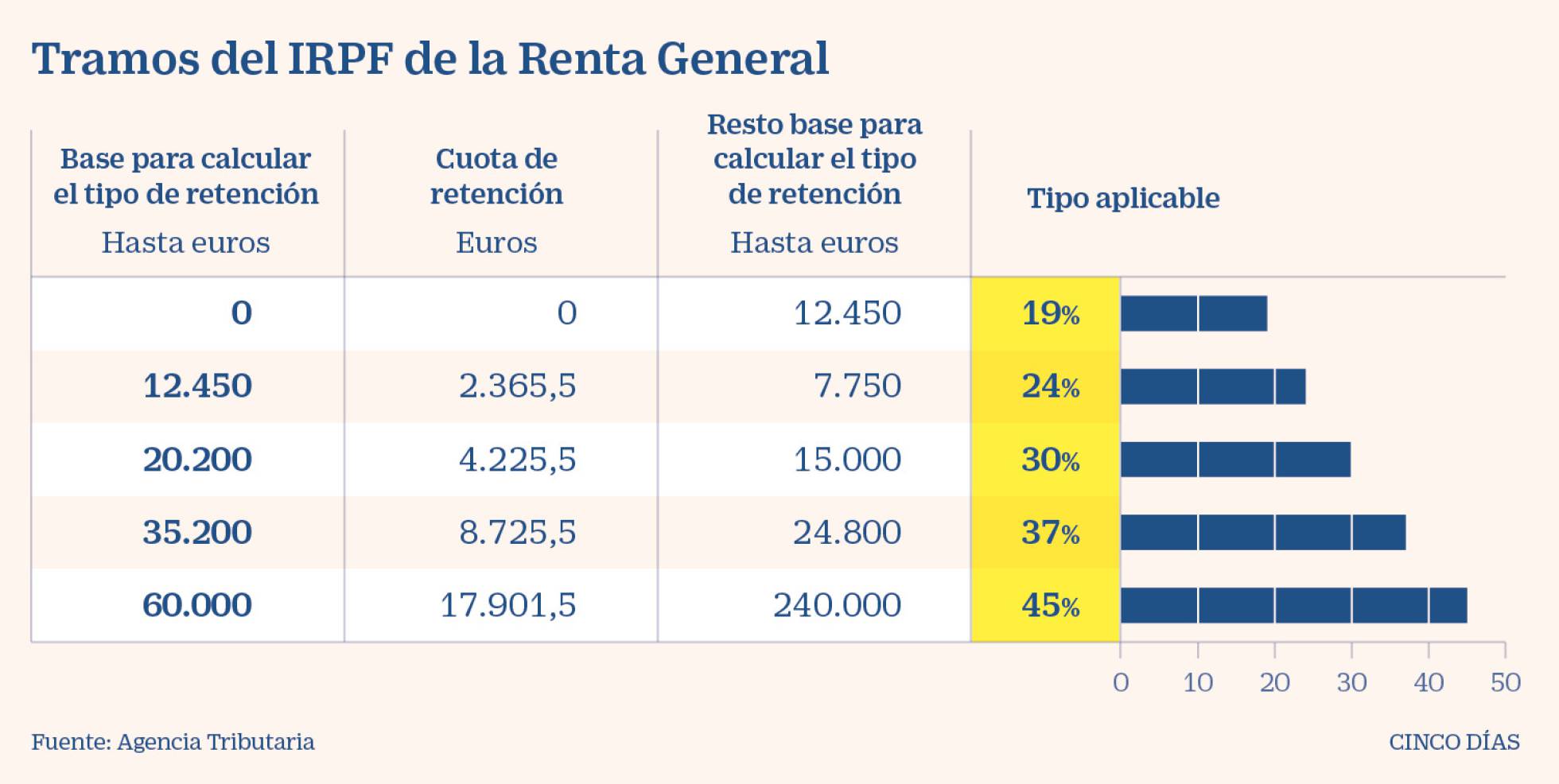
<p>Y si querías hilar fino, te creas un Excel con la típica tabla de tramos y te lo calculas manual:</p>

<p><img src="/images/tramos.jpg" alt="Tramos IPRF Estatales" /></p>

<p>¿Ya está, no? Pues no no…para calcular bien el sueldo neto de verdad hay muchos más detalles a tener en cuenta.</p>

<p>Un día quise derrotar ese dragón y entender lo mejor posible como se calcula. Mientras investigaba he ido desarrollando esta <a href="https://tecalculo.com/calculadora-de-sueldo-neto" target="\_blank">calculadora de sueldo neto</a> para validar lo que iba aprendiendo. Le faltan muchos casos y la UX es abominable pero he priorizado que sea cómodo de usar <del>y soy nefasto haciendo UX</del>. Agárrate que vienen curvas.</p>

<h2 id="conocimientos-básicos-primero-">Conocimientos básicos primero 🧑‍🏫</h2>

<p>Hay un especie de leyenda urbana que dice: <em>“Si te suben el sueldo y cambias de tramo puedes acabar cobrando menos”.</em> La he escuchado varias veces y explica muy bien que poca educación financiera hay en las escuelas, supongo que es más importante aprender que una persona separó los mares y multiplicó los panes…bueno, que me lío.</p>

<p>NO.</p>

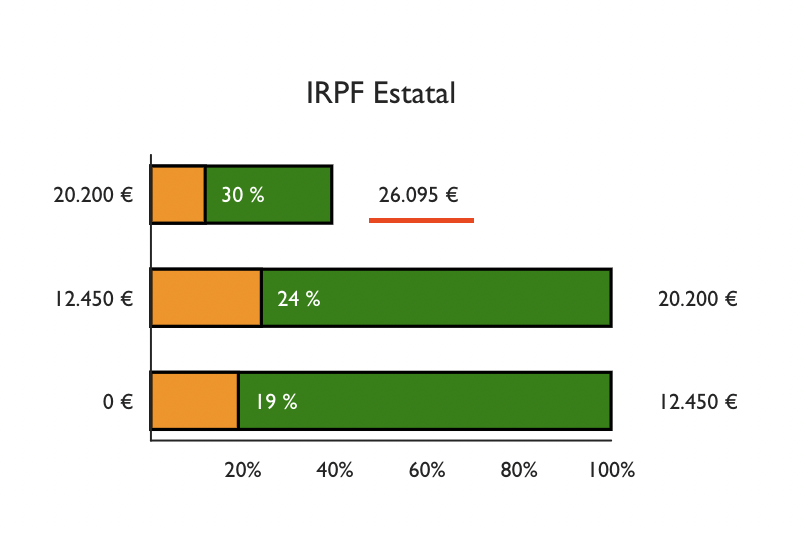
<p><strong>Es imposible que una subida de tu sueldo implique ganar menos en neto</strong>. Los tramos son acumulables. Ejemplo, imaginemos que Paco cobra 30.000€ brutos al año:</p>

<p>Los primeros 12.450€ tienen 19% de retención.
Lo que va entre 12.450€ y 20.200€, es decir, los siguientes 7.750€ tienen el 24% de retención.
Finalmente, la diferencia entre 26.095€ y 20.200€ =&gt; 5.895€ le retienen el 30%.</p>

<p>Siempre la primera parte del salario va a tener un retención mas baja y sube progresivamente en cada tramo. He intentado mostrar esto mediante gráficos en la <a href="https://tecalculo.com/calculadora-de-sueldo-neto" target="\_blank">calculadora</a>, pruébala.</p>

<p><img src="/images/tramosExplicados.png" alt="Tramos explicados" /></p>

<h2 id="gastos-">Gastos 🚗</h2>

<p>Si has estado leyendo con atención, te habrás dado cuenta que la última resta no uso 30.000€ y uso 26.095€. Uno de los motivos son los gastos.</p>

<p>Hay un mínimo de gastos de 2.000€, todos los calculos deben hacerse restando incialmente este valor del bruto, en el caso de Paco, tras restar los gastos nos quedan 28.000€. Pero esta cifra aún no es 26.095€, ¿qué falta? Seguridad Social.</p>

<h2 id="seguridad-social-">Seguridad Social 🏥</h2>

<p>Aparte de los gastos, otro concepto a descontar antes de calcular el IRPF es la Seguridad Social. Esto debería ser facil, es el 6,35% pero con un matiz, <a href="https://www.campmanyabogados.com/blog/bases-cotizacion">hay un mínimo y un máximo</a>. El máximo se alcanza con 48.841€ brutos anuales, todos los sueldos a partir de ahí pagan lo mismo. El mínimo* es 12.600€ brutos anuales.</p>

<p>A Paco le queda un pago a Seguridad Social de 1.905€ que si se lo restamos a 28.000€ ya tenemos la cifra que he usado en el cálculo anterior. Vamos a ponerle nombre a todo.</p>

<h2 id="base-imponible">Base imponible</h2>

<p><code class="language-plaintext highlighter-rouge">Base imponible = Salario Bruto - Gastos - Seguridad Social</code>
<code class="language-plaintext highlighter-rouge">26.095€ = 30.000€ - 2.000€ - 1.905€</code></p>

<h2 id="irpf-estatal-y-autónomico">IRPF Estatal y Autónomico</h2>

<p>Ahora si, con la base imponible ya podemos calcular el IRPF.</p>

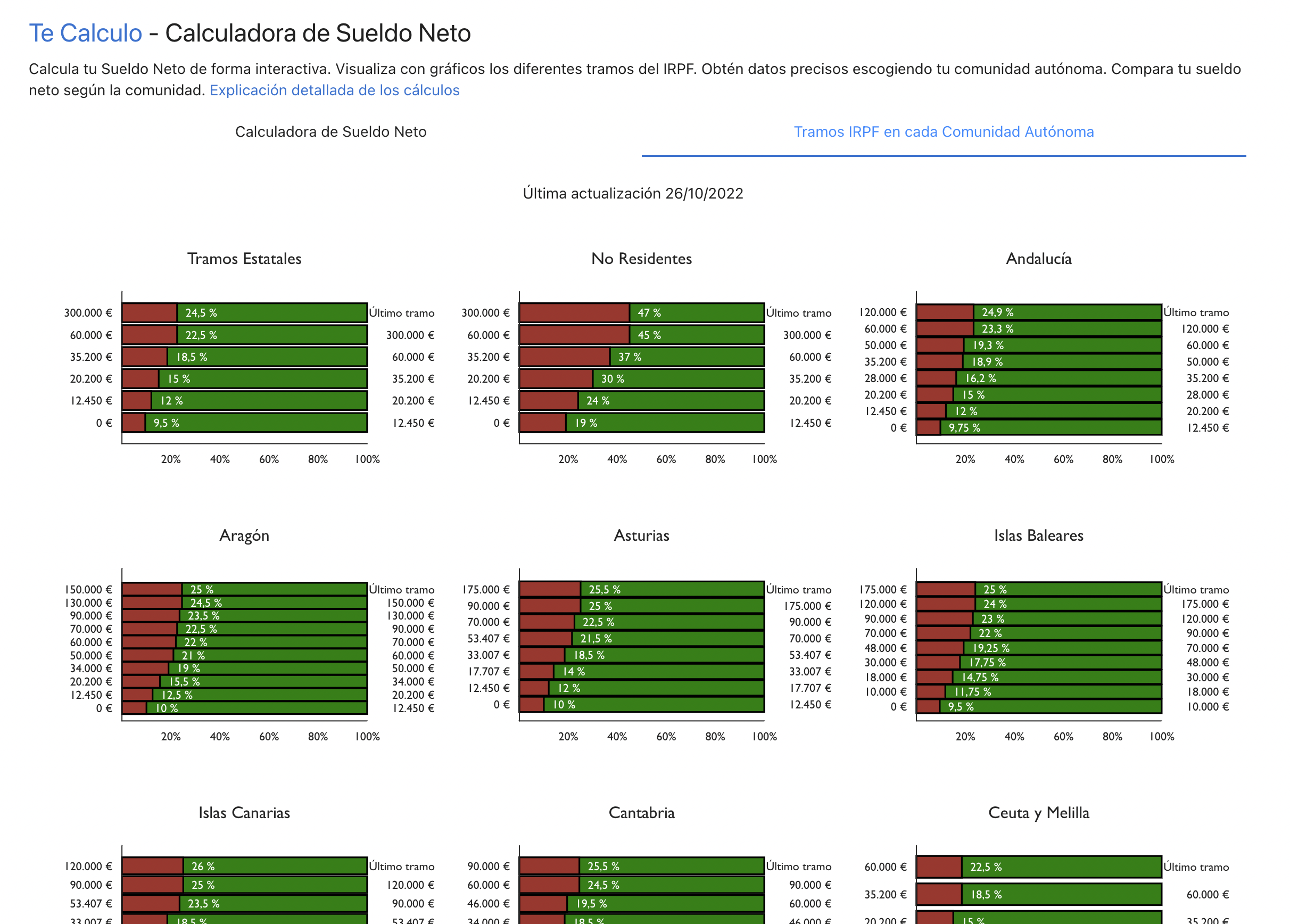
<p>Las calculadoras online normalmente solo te muestran unos tramos de IRPF. Esos tramos son los estatales y aplican a todos excepto vascos y navarros. Lo que no solemos tener en cuenta es que cada autonomía tiene sus tramos, y en TODAS son diferentes. <a href="https://tecalculo.com/calculadora-de-sueldo-neto" target="\_blank">Mira el desglose de los tramos IRPF de cada comunidad autónoma de España en la pestaña correspondiente</a>.</p>

<p><img src="/images/tramosComunidades.png" alt="Tramos IRPF de cada comunidad" /></p>

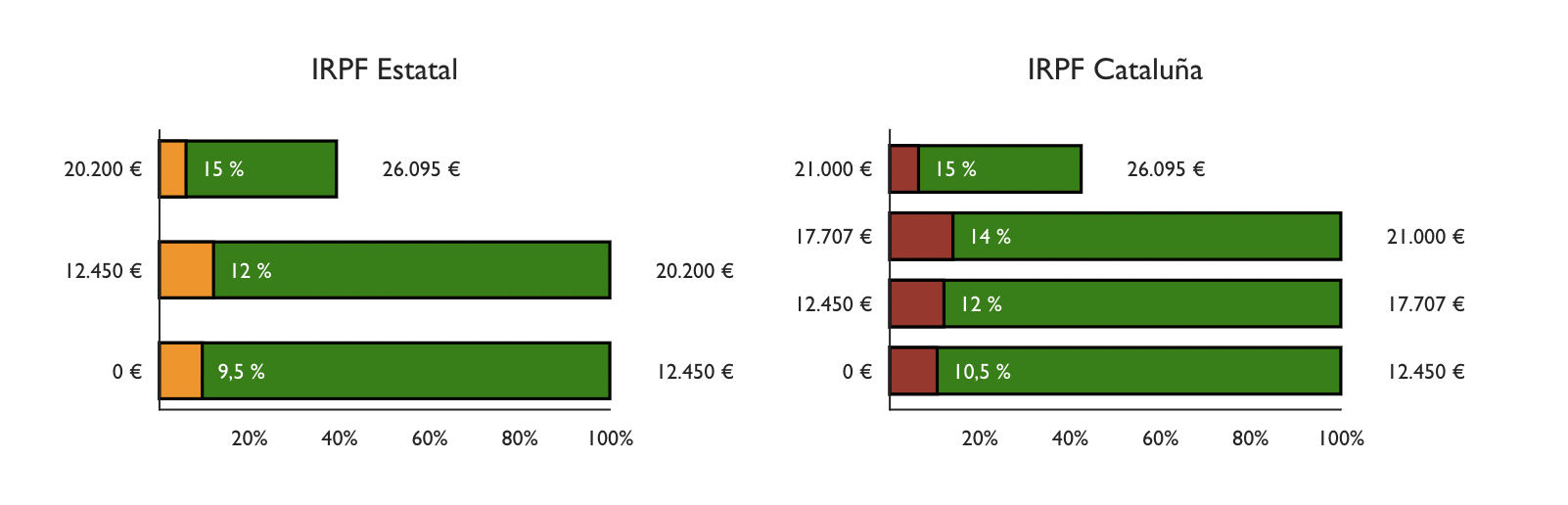
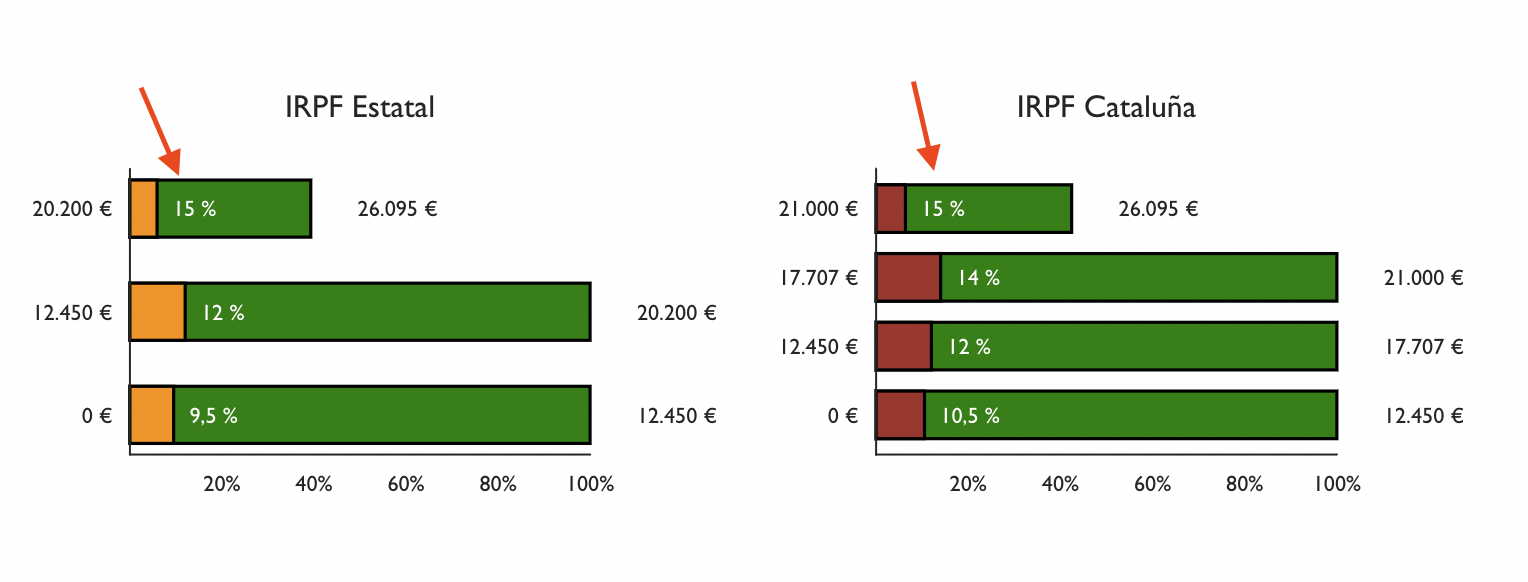
<p>La tabla Estatal típica solo aplica a españoles no residentes, si resides en territorio español, se usa la tabla de tu comunidad y la estatal (<strong>con la mitad del porcentaje en cada tramo</strong>). Fíjate en la imagen como los porcantajes estatales ahora son 9,5%, 12% y 15% en lugar de 19%, 24% y 30%.</p>

<p><img src="/images/dosTramos.png" alt="Tramos IRPF del estado y catalanes" /></p>

<p>Siguiendo el ejemplo de Paco, si viviera en Barcelona, tendríamos el siguiente IRPF:</p>

<ul>
  <li>Estado - 2.997€</li>
  <li>Cataluña - 3.163,35€</li>
  <li>Total - 6.160,35 (20,53%) (Estatal + Autónomico)</li>
</ul>

<p>Si estas haciendo los cálculos por tu lado y no te cuadran los números es normal, mira el siguiente punto.</p>

<h2 id="deducciones">Deducciones</h2>

<p>Posiblemente te suene la cifra 5.550€. Es el mínimo deducible. En el caso más común, persona soltera sin hijos etc., tiene ese mínimo deducible. Para deducirlo se aplican los tramos también. Es decir, para saber cuanto nos podemos deducir si vivimos en Cataluña tenemos que aplicar los tramos del estado y de la autonomía a la cifra a deducir. Ejemplo:</p>

<p>5.550€ está tanto en el primer tramo del Estado (hasta 12.450€) como de Cataluña (hasta 12.450€), por lo tanto se aplica el tipo del primer tramo:</p>

<ul>
  <li>Estado 9,5% - 527,25€</li>
  <li>Cataluña 10,5% - 582,75€</li>
</ul>

<p>A los impuestos totales del estado se les resta la deducción calculada, igual con la autonomía.</p>

<p><code class="language-plaintext highlighter-rouge">IRPF = IRPF base imponible (tramos) - deducciones (tramos)</code></p>

<p>Este es el caso estándar, las deducciones aumentan por cada hijo, por cada ancestro dependiente, etc. He recogido algunos de estos casos en la <a href="https://tecalculo.com/calculadora-de-sueldo-neto" target="\_blank">calculadora de sueldo neto</a>, pero me quedan varios por añadir.</p>

<p>Imaginemos que Paco tiene gemelos, 2 hijos de menores de 3 años. Pues las deducciones aumentan hasta quedar:</p>

<ul>
  <li>Estado 4,66% - 1.035,5€</li>
  <li>Cataluña 5,2% - 1.144,5€</li>
</ul>

<p>El sueldo neto mensual con 12 pagas resultante es 2.009,55€, que comparado con el sueldo sin hijos (1.920,39€) resulta en 42,5€ más al mes por tener dos hijos menores de 3 años, no se si llega para los pañales.</p>

<p>He añadido en la calculadora este dato</p>

<p><img src="/images/beneficioDeduccion.png" alt="Beneficio deducción" /></p>

<p><em>Ten en cuenta que estoy asumiendo que Paco hace una declaración individial, por lo tanto la deducción es del 50%. Si la hace conjunta (solo casados), obtiene el 100%, el doble de deducción que individual.</em></p>

<h2 id="la-fórmula-tada">La fórmula :tada:</h2>

<p>La fórmula final para el cálculo de tu sueldo neto es la siguiente:</p>

<p><code class="language-plaintext highlighter-rouge">Salario Neto = Salario Bruto - Gastos - Seguridad Social - IRPF Estatal - IRPF Autonomico</code></p>

<p>Con los matices ya comentados:</p>

<ul>
  <li>El IRPF y sus deducciones se calculan sobre la base imponible y con los tramos correspondientes.</li>
  <li>Hay mínimo y máximo de Seguridad Social.</li>
</ul>

<p>Espero haber aclarado un poco como funciona este cálculo, es importanto conocer esta información.</p>

<h2 id="bonus-tracks">Bonus tracks</h2>

<p>A partir de aquí ya hablo de otros conceptos muy importantes a tener en cuenta cuando hablamos del sueldo.</p>

<h2 id="el-tipo-marginal">El tipo marginal</h2>

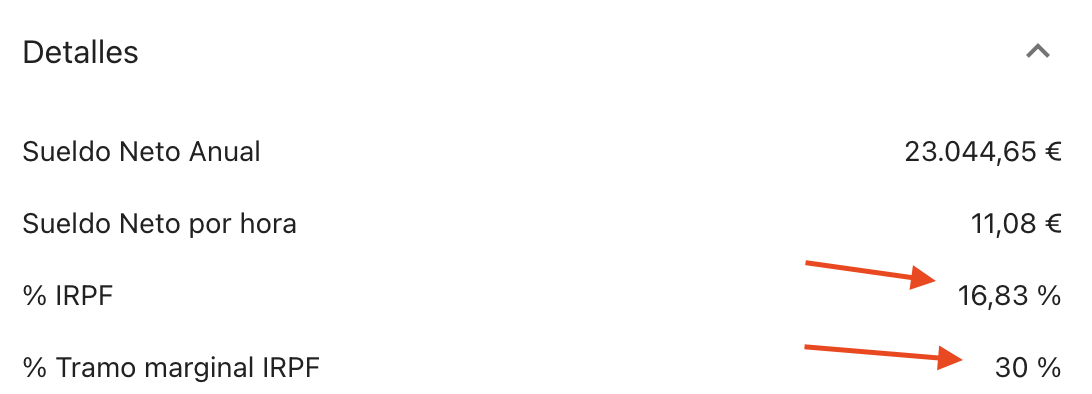
<p>Paco hace un trabajo excelente y le dan un bonus extra de 2.000€. ¿Cuánto recibirá en neto nuestro amigo? La tentación es calcular con el porcentaje de IRPF que paga del total del salario (16,83%). Pero es erróneo, como todo funciona por tramos, ese ingreso extra va directo al último tramo, el tramo marginal, que en este caso es de 30%. 15% estatal y 15% autonómico. Por la tanto el neto del bonus será 1.400€. He añadido el tipo marginal en los detalles:</p>

<p><img src="/images/tramoMarginalGrafico.png" alt="Tramo marginal en los tramos IRPF" /></p>

<p><img src="/images/tramoMarginalDetalles.png" alt="Tramo marginal en los detalles" /></p>

<h2 id="pagas-extras">Pagas extras</h2>

<p>Cuando tenemos 14 pagas en lugar de 12. Las mal llamadas “pagas extras” son más grandes porque no se les reduce la seguridad social. La seguridad social es paga en 12 pagas siempre.</p>

<p><img src="/images/pagaExtra.png" alt="Ejemplo de sueldo neto con 14 pagas" /></p>

<h2 id="comparar-sueldo-neto-entre-comunidades">Comparar sueldo neto entre comunidades</h2>

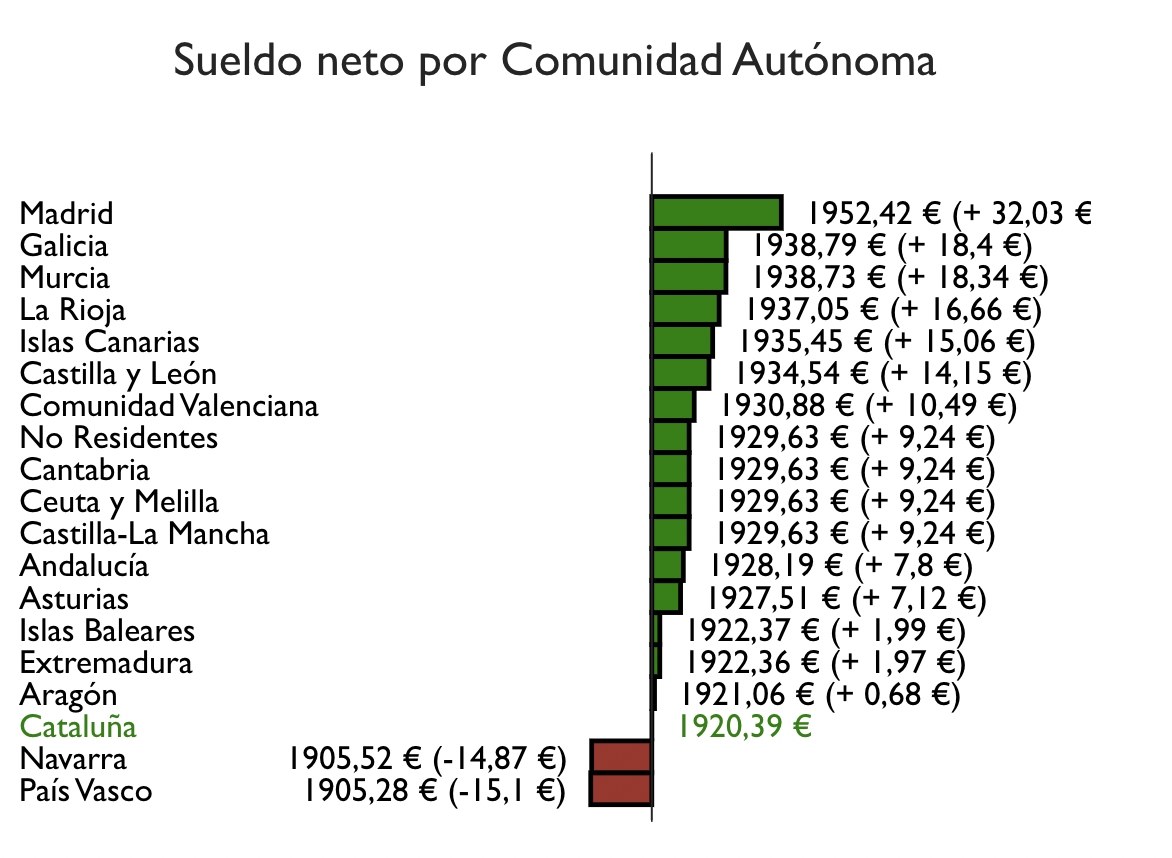
<p>Para poder ver la diferencia real entre comunidades he añadido un gráfico donde se puede ver cual sería el salario neto en cada comunidad y la diferencia con la comunidad seleccionado. Cuando tu bruto son 30.000€ parece que Cataluña es casi la comunidad con mas carga impositiva. Madrid donde el sueldo neto sería superior.</p>

<p><img src="/images/compararSueldoNetoComunidades.png" alt="Comparar sueldo neto entre comunidades" /></p>

<h2 id="siguientes-pasos">Siguientes pasos</h2>

<ul>
  <li>Añadir los deducciones que faltan.</li>
  <li>Añadir tickets restaurant, guardería, etc. como cotizan.</li>
  <li>Mejorar la UX.</li>
</ul>

<h4 id="fuentes">Fuentes</h4>

<ul>
  <li><a href="https://www.businessinsider.es/tablas-irpf-comunidades-autonomas-cuanto-pagas-renta-625415">Tablas de IRPF por comunidades autónomas</a></li>
  <li><a href="https://ekuatio.com/como-se-calcula-el-porcentaje-de-irpf-en-la-nomina/">Cómo se cálcula el porcantaje de IRPF</a></li>
  <li><a href="https://www2.agenciatributaria.gob.es/wlpl/PRET-R170/index.zul">Cálculo de rentenciones</a></li>
  <li><a href="https://www.finect.com/usuario/Josetrecet/articulos/hijos-declaracion-renta">Cuánto puedes desgravarte en la renta por tus hijos</a></li>
</ul>]]></content><author><name>Juan Pallarès</name><email>juan@pallares.me</email></author><category term="sueldo" /><category term="salario" /><category term="neto" /><category term="bruto" /><category term="salary" /><category term="calculator" /><category term="net" /><summary type="html"><![CDATA[Cómo funciona realmente el cálculo del IRPF, seguridad social, etc.]]></summary></entry><entry xml:lang="en"><title type="html">Net salary calculator</title><link href="https://juan.pallares.me/net-salary-calculator/" rel="alternate" type="text/html" title="Net salary calculator" /><published>2022-12-04T00:00:00+01:00</published><updated>2022-12-04T00:00:00+01:00</updated><id>https://juan.pallares.me/net-salary-calculator</id><content type="html" xml:base="https://juan.pallares.me/net-salary-calculator/"><![CDATA[<p><strong>This is an update of the article published on 04/07/2021</strong></p>

<p>Imagine that you have a job offer, a new annual gross salary that sounds tempting, but what is the equivalent monthly net salary? What is the rise from your current job? Imagine that you can compare your current salary with the future one by simply dragging a slider, I bring you the solution:</p>

<p>:moneybag: <a href="https://tecalculo.com/en/spanish-net-salary-calculator" target="\_blank"><strong>Net Salary Calculator</strong></a></p>

<p>If you are like me, to calculate the net salary you used to pick the <a href="https://cincodias.elpais.com/herramientas/calculadora-sueldo-neto/">first result of Google</a>. Scrolling up and down all the time, bad UX, refreshing the page that by the way, it’s not mobile friendly.</p>

<p>And if you wanted to go one step further, you created an Excel sheet with the typical sections table and you calculated it manually:</p>

<p><img src="/images/tramos.jpg" alt="Estatal IPRF sections" /></p>

<p>So…that’s it? Well no … to calculate well the net salary, there are many more details to consider.</p>

<p>One day I wanted to defeat that dragon and understand as much as possible how it’s calculated. While I was investigating, I have been developing this <a href="https://tecalculo.com/en/spanish-net-salary-calculator" target="\_blank">net salary calculator</a> to validate what I was learning. Many cases are missing and the UX is abominable but I have prioritized the usability and <del>I suck doing UX</del>. Brace yourselves.</p>

<h2 id="basic-knowledge-first-">Basic knowledge First 🧑‍🏫</h2>

<p>There is a urban legend that says: “If your salary raises and changes to the next section, you can end up earning less.” I have heard it several times and explains very well the little financial education there is in schools, I guess it’s more important to learn that a person split the seas and multiplied the bread … well, I stop before I lose focus.</p>

<p>NO.</p>

<p><strong>It is impossible that a raise of your salary ends up with you earning less net salary</strong>. The sections are cumulative. Example, let’s imagine that Paco earns 30.000€ gross per year:</p>

<p>The first 12.450€ have 19% retention. What goes between 12.450€ and 20.200€, that is the following 7.750€ have 24% retention. Finally, the difference between 26.095€ and 20.200€ =&gt; 5.895€ retains 30%.</p>

<p>Always the first part of the salary will have a lower retention and increase progressively in each section. I tried to show this through graphics in the [calculator]https://tecalculo.com/calculadora-de-sueldo-neto</p>

<p><img src="/images/tramosExplicados.png" alt="Explanted sections" /></p>

<h2 id="expenses-">Expenses 🚗</h2>

<p>If you have been reading carefully, you will have noticed that the last subtraction did not use 30.000€ and used 26.095€. One of the reasons is the expenses.</p>

<p>There is a minimum expense of 2.000€. All calculations must be made by initially subtracting this value from the gross. In Paco’s case, after restoring the expenses, we are left with 28.000€. But this figure is not yet 26.095€ what is missing? Social Security.</p>

<h2 id="social-security-">Social Security 🏥</h2>

<p>Apart from expenses, another concept to discount before calculating personal income tax is Social Security. This should be easy, it is 6.35% but with a nuance, <a href="https://www.campmanyabogados.com/blog/bases-cotizacion">there is a minimum and a maximum</a>. The maximum is reached with 48.841€ gross per year, all salaries from there pay the same. The minimum* is 12.600€ gross per year.</p>

<p>Paco has a Social Security payment of 1.905€ left, which if we subtract it from 28.000€ we already have the figure he used in the previous calculation. Let’s name everything.</p>

<h2 id="tax-base">Tax base</h2>

<p><code class="language-plaintext highlighter-rouge">Tax base = Gross salary - Expenses - Social Security</code>
<code class="language-plaintext highlighter-rouge">26.095€ = 30.000€ - 2.000€ - 1.905€</code></p>

<h2 id="state-pit-and-autonomic-pit">State PIT and autonomic PIT</h2>

<p>Now we can, once we have the tax base we can calulate the PIT.</p>

<p>Online calculators normally only show you some sections of the IRPF (PIT). These sections are for the state and apply to all except Basques and Navarros. What we do not usually take into account is that each autonomy has its sections, and it’s different for each one of them. <a href="https://tecalculo.com/en/spanish-net-salary-calculator" target="\_blank">Take a look at the different sections per community in the calculator tab</a>.</p>

<p><img src="/images/tramosComunidades.png" alt="PIT Sections per community" /></p>

<p>The typical state table only applies to non-resident Spaniards, if residing in Spanish territory, the table of your community and the state (with half the percentage in each section) is used. Check how the Spanish percents are now 9,5%, 12% and 15% instead of 19%, 24% and 30%</p>

<p><img src="/images/dosTramos.png" alt="Spain and Catalan sections" /></p>

<p>Following the example of Paco, if he lived in Barcelona, we would have the following PIT:</p>

<ul>
  <li>State - 2.997€</li>
  <li>Catalonia - 3.163,35€</li>
  <li>Total - 6.160,35€ (20,53%) (State + Catalonia)</li>
</ul>

<p>If you are doing the calculations by your side and the numbers do not match it’s normal, look at the next point.</p>

<h2 id="deductions">Deductions</h2>

<p>A number that may ring a bell is 5.550€. It’s the minimum deductible. The most common case: single person without children etc. has that deductible minimum. To deduce it, the sections are applied as well. That is, to know how much we can deduce if we live in Catalonia we have to apply the sections of the State and autonomy to the figure to be deduced. Example:</p>

<p>5.550€ is both in the first stretch of the state (up to 12,450€) and Catalonia (up to 17.707,02€), therefore the type of the first section is applied:</p>

<ul>
  <li>State 9,5% - 527,25 €</li>
  <li>Catalonia 10,5% - 582,75€</li>
</ul>

<p><code class="language-plaintext highlighter-rouge">PIT = PIT tax base (sections) - deductions (sections)</code></p>

<p>We substract the deducted amount from the taxes (both state and autonomy).</p>

<p>This is the standard case, deductions increase by each child, for each dependent ancestor, etc. I have collected some of these cases in the <a href="https://tecalculo.com/en/spanish-net-salary-calculator" target="\_blank">net salary calculator</a>, but I have several left to add.</p>

<p>Imagine that Paco has twins, 2 children under 3 years. The deductions increase:</p>

<ul>
  <li>Status 4,66% - 1.035,5€</li>
  <li>Catalonia 5,2% - 1.144,5€</li>
</ul>

<p>The monthly net salary with 12 resulting payments is 2.009,55€, which compared to the salary without children (1.920,39€) is 42,5€ more per month for having two children under 3 years, I do not know if it’s enough for the diapers.</p>

<p>I added to the calculator this data</p>

<p><img src="/images/beneficioDeduccion.png" alt="Deduction benefit" /></p>

<p><em>Note that I am assuming that Paco makes an individual PIT declaration, therefore the deduction is 50%. If you do it jointly (only married couples can), you get 100%.</em></p>

<h2 id="the-formula-tada">The formula :tada:</h2>

<p>The basic formula is as follows:</p>

<p><code class="language-plaintext highlighter-rouge">Net Salary = Gross Salary - Expenses - Social Security - State PIT - Autonomic PIT</code></p>

<p>With the details already commented:</p>

<ul>
  <li>The PIT and his deductions are calculated from the tax base. Corresponding PIT sections are used.</li>
  <li>There is minimum and maximum social security.</li>
</ul>

<p>I hope I have clarified a bit. I believe it’s important to have this knowledge.</p>

<h2 id="bonus-tracks">Bonus tracks</h2>

<p>From here I will talk about other very important concepts to take into account when we talk about salary.</p>

<h2 id="the-marginal-rate">The Marginal Rate</h2>

<p>Paco does an excellent job and they give him an extra bonus of 2.000€. How much will our friend receive in net? The temptation is to calculate with the rate of personal income tax paid out of the total salary (20.53%). But this is wrong, since everything works in sections, that extra income goes directly to the last section, the marginal section, which in this case is 30%. 15% state and 15% regional. Therefore the net of the bonus will be 1.400€. I’ve added the marginal type in the details:</p>

<p><img src="/images/tramoMarginalGrafico.png" alt="Marginal rate in Personal Income Tax tranches" /></p>

<p><img src="/images/tramoMarginalDetalles.png" alt="Marginal rate in the details" /></p>

<h2 id="extra-payments">Extra payments</h2>

<p>When we have 14 payments instead of 12. The so-called “extra payments” are bigger because social security is not reduced. Social security is always paid in 12 payments.</p>

<p><img src="/images/pagaExtra.png" alt="Example of net salary with 14 payments" /></p>

<h2 id="compare-net-salary-between-communities">Compare net salary between communities</h2>

<p>In order to see the real difference between communities I have added a graph where you can see what the net salary would be in each community and the difference with the selected community. When your gross is 30.000€ it seems that Catalonia is almost the community with the highest tax burden. Madrid, on the contrary, where the net salary would be higher.</p>

<p><img src="/images/compararSueldoNetoComunidades.png" alt="Compare net salary between communities" /></p>

<h2 id="next-steps">Next steps</h2>

<ul>
  <li>Add the remaining deductions.</li>
  <li>Add tickets restaurant, kindergarden, etc.</li>
  <li>Improve UX.</li>
</ul>

<h4 id="sources">Sources</h4>

<ul>
  <li><a href="https://www.businessinsider.es/tablas-irpf-comunidades-autonomas-cuanto-pagas-renta-625415">Tablas de IRPF por comunidades autónomas</a></li>
  <li><a href="https://ekuatio.com/como-se-calcula-el-porcentaje-de-irpf-en-la-nomina/">Como se cálcula el porcantaje de IRPF</a></li>
  <li><a href="https://www2.agenciatributaria.gob.es/wlpl/PRET-R170/index.zul">Cálculo de rentenciones</a></li>
  <li><a href="https://www.finect.com/usuario/Josetrecet/articulos/hijos-declaracion-renta">Cuánto puedes desgravarte en la renta por tus hijos</a></li>
</ul>]]></content><author><name>Juan Pallarès</name><email>juan@pallares.me</email></author><category term="sueldo" /><category term="salario" /><category term="neto" /><category term="bruto" /><category term="salary" /><category term="calculator" /><category term="net" /><summary type="html"><![CDATA[Personal income taxes in Spain explained]]></summary></entry><entry xml:lang="en"><title type="html">Use Jekyll with Visual Studio Code Dev Containers and Colima</title><link href="https://juan.pallares.me/jekyll-in-visual-studio-code-dev-container-with-colima/" rel="alternate" type="text/html" title="Use Jekyll with Visual Studio Code Dev Containers and Colima" /><published>2022-11-12T00:00:00+01:00</published><updated>2022-11-12T00:00:00+01:00</updated><id>https://juan.pallares.me/jekyll-in-visual-studio-code-dev-container-with-colima</id><content type="html" xml:base="https://juan.pallares.me/jekyll-in-visual-studio-code-dev-container-with-colima/"><![CDATA[<h2 id="intro">Intro</h2>

<p>Configuring the dev environment can be difficult. <a href="https://juan.pallares.me/configure-jekyll-multi-language-without-plugin/">One example is this blog</a>, it requires ruby, some “"”amazing””” rubygems, etc. configuring it in MacOS is hard, in Windows is directly a nightmare. Recently, I tried to write a post from a new laptop, the moment I saw I could not build the jekyll site I desisted. I pushed to a branch and built in another machine. Then I learned about <a href="https://code.visualstudio.com/docs/devcontainers/containers">Visual Studio Code Dev Containers</a>.</p>

<h2 id="automate-dev-container-creation-">Automate Dev Container creation 🤖</h2>

<p>So can I configure a container and build my blog directly there? Can I forget about configuring Jekyll in each machine I want to blog from? Yes you can!</p>

<iframe src="https://giphy.com/embed/SWuKsQEzr42m1X0pec" width="480" height="480" frameborder="0" class="giphy-embed" allowfullscreen=""></iframe>

<p>Ok cool, but how do I configure the container? that will be hard! well, I have good news, there are predefined examples and the Jekyll one works out of the box. <a href="https://code.visualstudio.com/docs/devcontainers/create-dev-container#_automate-dev-container-creation">Check the documentation</a>, you just need to:</p>

<ul>
  <li>Open Command Palette (<code class="language-plaintext highlighter-rouge">F1</code>)</li>
  <li>Select <code class="language-plaintext highlighter-rouge">Dev Containers: Add Dev Container Configuration Files</code></li>
  <li>Look for the <code class="language-plaintext highlighter-rouge">Jekyll</code> one</li>
</ul>

<h2 id="i-dont-have-docker-desktop-whale">I don’t have Docker Desktop :whale:</h2>

<p>One of the requirements to run VS Code Dev Containers is having Docker Desktop. If you don’t have it and you are using a Mac, I got you covered, meet <a href="https://github.com/abiosoft/colima">Colima</a>.</p>

<p>Steps to install:</p>

<ul>
  <li>Uninstall previous Docker Desktop App and related files. If you used brew to install, you can use: <code class="language-plaintext highlighter-rouge">brew uninstall --cask docker</code></li>
  <li>Then run <code class="language-plaintext highlighter-rouge">brew install colima</code></li>
  <li>Install dependencies <code class="language-plaintext highlighter-rouge">brew install docker docker-compose</code></li>
  <li>Finally run it <code class="language-plaintext highlighter-rouge">colima start</code></li>
</ul>

<p>And that’s it, VS Code Dev Containers will works flawlessly. Be aware Colima by default uses 2 CPUs, 2GiB memory and 60GiB storage but this can be configured.</p>

<h3 id="known-issues">Known issues</h3>

<p>Once you get into the container there is no git anymore =&gt; To solve it, run <code class="language-plaintext highlighter-rouge">git status</code>. It will suggest a command like <code class="language-plaintext highlighter-rouge">git config --global --add safe.directory /path/to/repo</code>. Run it and git will be back.</p>

<h2 id="conclusion">Conclusion</h2>

<p>I’ll keep an any for more automated containers, they can be super helpful when the environment configuration is complex. Are you planning to use it for any of your projects?</p>]]></content><author><name>Juan Pallarès</name><email>juan@pallares.me</email></author><category term="jekyll" /><category term="vscode" /><category term="container" /><category term="docker" /><category term="blog" /><category term="setup" /><summary type="html"><![CDATA[Forget about configuration and go straight to write posts]]></summary></entry><entry xml:lang="en"><title type="html">Book - The Art of Unit Testing, 2nd Edition - Roy Osherove</title><link href="https://juan.pallares.me/the-art-of-unit-testing/" rel="alternate" type="text/html" title="Book - The Art of Unit Testing, 2nd Edition - Roy Osherove" /><published>2022-11-06T00:00:00+01:00</published><updated>2022-11-06T00:00:00+01:00</updated><id>https://juan.pallares.me/the-art-of-unit-testing</id><content type="html" xml:base="https://juan.pallares.me/the-art-of-unit-testing/"><![CDATA[<h2 id="intro">Intro</h2>

<p>Some weeks ago I finished reading <a href="https://juan.pallares.me/books/the-art-of-unit-testing-2nd-edition/">The Art of Unit Testing by Roy Osherove</a>. I really loved and I wanted to do a summary but I’ve been <del>lazy lately</del> busy with the <a href="tecalculo.com">tecalculo.com</a> calculators. As usual, the <a href="https://juan.pallares.me/books/the-art-of-unit-testing-2nd-edition/">summary</a> is in <a href="https://juan.pallares.me/books/">Books collection</a> but I’ll do a more detailed one here.</p>

<p>Reading this books has been humbling, I learned about some mistakes I have been making. Also the importance to calling things by their name.</p>

<h2 id="key-learningsreminders-">Key learnings/reminders 🔑</h2>

<h3 id="unit-vs-integration">Unit vs Integration</h3>

<p>I was taught, when I started doing test that a unit test was only meant to cover a method. That’s not completely true. Let’s define a Unit of work. <strong>A Unit of Work can span as little as a single method and up to multiple classes and functions to achieve its purpose</strong>. It’s completely ok to have a unit tests that implies a method that calls other method in another class as long as is the same Unit of Work.</p>

<p>I needed to clarify the Unit of Work concept so now we can define the difference between unit test and integration test.</p>

<ul>
  <li><strong>Unit tests isolate the unit of work from its dependencies</strong> so that they’re consistent in their results and can easily control and simulate any aspect of the unit’s behavior.</li>
  <li><strong>Integration testing is testing a unit of work without having full control over all of it</strong> and using one or more of its real dependencies, such as time, network, database, threads, random number generators, and so on.</li>
</ul>

<h3 id="fakes---stubs-and-mocks">Fakes - Stubs and Mocks</h3>

<p>Again, when I first learned testing, I just created “mocks” and then setup them to return what I needed in some cases. In other cases, I verified what parameters they were called with. Well, the tests could be working but I didn’t really know what I was doing completely.</p>

<p>When you <strong>setup</strong> an object to return something, what you are using is an <strong>Stub</strong>.
When you <strong>verify</strong> an object has been called, what you are using is a <strong>Mock</strong>.</p>

<p>If you want to refer to both type of objects (Stub and Mock) then you should call them <strong>Fakes</strong>.</p>

<p>In my defense, I will say I tend to use <a href="https://github.com/moq/moq4">Moq</a> as testing framework and there they use <code class="language-plaintext highlighter-rouge">Mock</code> name for both Stubs and Mocks, contributing to my confussion.</p>

<h3 id="types-of-tests">Types of tests</h3>

<p>This is something I knew but never put a name of it. Types of tests, let’s go over them even if I think the names are pretty self-explanatory.</p>

<ul>
  <li><strong>Value based testing</strong> - We verify the returned value is the expected one.</li>
  <li><strong>State Based testing</strong> - We verify the state has changed as expected. Maybe a boolean property of the class.</li>
  <li><strong>Interaction testing</strong> - We verify that after calling a method, another method is called somewhere (usually verified with Mocks).</li>
</ul>

<p>If possible, is preferable to do value based testing. If not possible, then state based. The least desirable since it’s the harder to test, interaction testing.</p>

<h3 id="test-only-one-concern">Test only one concern</h3>

<p>Tests should not have any logic. Conditional expressions, loops, etc. are a smell. But more important, test should cover only one concern. <strong>Ideally, each test should have only one <code class="language-plaintext highlighter-rouge">Assert</code>, failing only for one reason</strong>.
How often have you asserted in the same test that the value returned is correct AND that the result is logged? Better to do two tests.</p>

<p>Another smell, having more than one Mock. Said with other words, having more than one fake verifying a behaviour. If you need two, create two tests. Again, in Moq it can get confusing because Stubs are called “Mocks”.</p>

<p>Last example, doing an Assert for each property of an object, is much better to an expected object and compare only once with an Assert.</p>

<h3 id="setup-methods-with-too-much-configuration">Setup methods with too much configuration</h3>

<p>Setup methods should only have code that applies to ALL tests in the current class. I’m guilty as charged of puting to much stuff in the Setup method. The key idea to remember: Each test should setup its own mocks and stubs, not needing to jump to the setup to understand.</p>

<h2 id="closing">Closing</h2>

<p>As a closing, when writing tests we should try to make it “FICC compliant”. <strong>The FICC properties are: fast, isolated, configuration-free, and consistent</strong>. 
If it’s hard to write such a test, or if it takes a long time to write it, the system isn’t testable.</p>]]></content><author><name>Juan Pallarès</name><email>juan@pallares.me</email></author><category term="books" /><category term="unit testing" /><category term="integration testing" /><category term="unit of work" /><category term="stub" /><category term="fake" /><category term="mock" /><summary type="html"><![CDATA[It's never too late to realize about mistakes I've been doing while testing]]></summary></entry><entry xml:lang="en"><title type="html">Convert O’Reilly highlights csv to Markdown. Then use them in your Jekyll blog as a collection</title><link href="https://juan.pallares.me/parse-oreilly-highlights-to-markdown/" rel="alternate" type="text/html" title="Convert O’Reilly highlights csv to Markdown. Then use them in your Jekyll blog as a collection" /><published>2022-08-03T00:00:00+02:00</published><updated>2022-08-03T00:00:00+02:00</updated><id>https://juan.pallares.me/parse-oreilly-highlights-to-markdown</id><content type="html" xml:base="https://juan.pallares.me/parse-oreilly-highlights-to-markdown/"><![CDATA[<h2 id="-tldr">🏃 TL;DR</h2>

<p>Find the script here <a href="https://gitlab.com/jpallares/highlights-to-markdown">Highlights to Markdown</a>, enjoy!</p>

<h2 id="context">Context</h2>

<p>I’m lucky to have an <a href="https://www.oreilly.com/online-learning/pricing.html">O’Reilly subscription</a> paid by my employer (thank you <a href="https://www.thetrainline.com/">Trainline</a>!). When reading books from the tablet, I like highlighting interesting stuff all the time. It’s my way of filtering the most important information and re-read it when needed. But how can I extract this data?</p>

<h2 id="️-getting-the-csv-file">🕵️ Getting the csv file</h2>

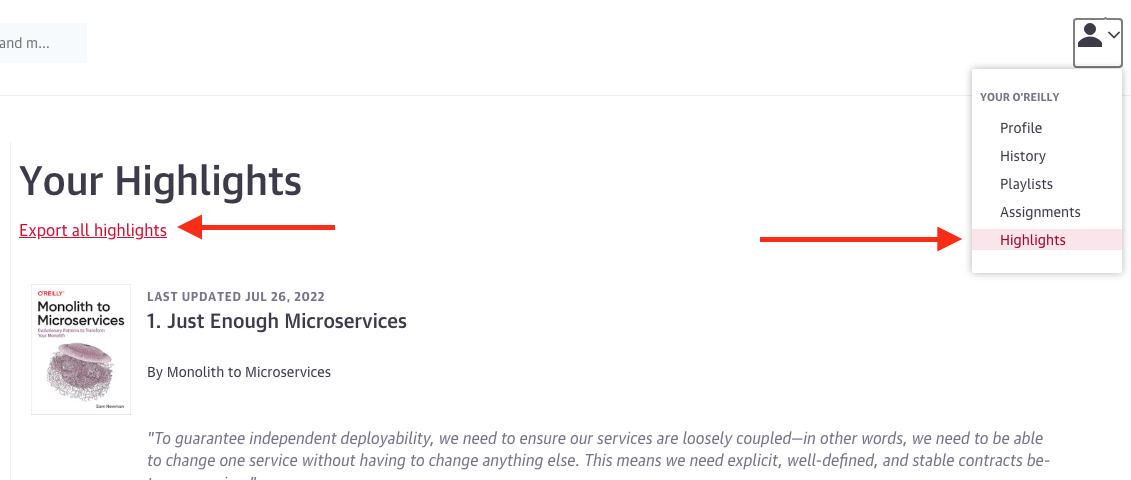
<p>Going to my O’Reilly profile, I realized all the highlights I made were stored there. There is a link to export them as a csv file:</p>

<p><img src="/images/how_to_export_highlights.png" alt="How to export O'Reilly highlights" /></p>

<h2 id="-reusing-previous-script">💻 Reusing previous script</h2>

<p>Recently, <a href="https://juan.pallares.me/parse-your-kindle-clippings-into-your-jekyll-blog/">I created an script to parse the highlights from Kindle</a> so I decided to extend it to support O’Reilly too.</p>

<p>Converting the csv to an object was a different process than in kindle since the source is a txt file. But once I have an object I could reuse the logic that creates the Markdown file. Check out the resulting code in <a href="https://gitlab.com/jpallares/highlights-to-markdown">Highlights to Markdown</a>. In <a href="https://juan.pallares.me/books">the books section</a> there are already some O’Reilly highlights added like <a href="https://juan.pallares.me/books/the-art-of-unit-testing-2nd-edition/">The Art of Unit Testing</a>.</p>

<h2 id="-key-differences">🔑 Key differences</h2>

<p>Pro:</p>

<ul>
  <li>The csv includes the chapter were the highlight was made, giving more context than in the Kindle file</li>
</ul>

<p>Con:</p>

<ul>
  <li>For an unkown reason, the csv file does not include the author of the book, it has to be added manually.</li>
</ul>

<h2 id="writing_hand-next-steps">:writing_hand: Next steps</h2>

<p>When reading from the Kindle app instead of a Kindle device, another kind of file can be generated. It’s HTML instead of txt. It will be my next update to this script. I’ll keep you posted!</p>]]></content><author><name>Juan Pallarès</name><email>juan@pallares.me</email></author><category term="node" /><category term="oreilly" /><category term="books" /><category term="highlights" /><category term="Markdown" /><category term="blog" /><category term="jekyll" /><summary type="html"><![CDATA[Do you know that all the interesting stuff that you highlight in your O'Reilly subscription books can be exported to a csv? With my tool you can parse this file to a more legible markdown format.]]></summary></entry><entry xml:lang="en"><title type="html">How to book andjoy classes automatically</title><link href="https://juan.pallares.me/how-to-book-andjoy-class-automatically/" rel="alternate" type="text/html" title="How to book andjoy classes automatically" /><published>2022-06-06T00:00:00+02:00</published><updated>2022-06-06T00:00:00+02:00</updated><id>https://juan.pallares.me/how-to-book-andjoy-class-automatically</id><content type="html" xml:base="https://juan.pallares.me/how-to-book-andjoy-class-automatically/"><![CDATA[<h2 id="the-problem">The problem</h2>

<p>In most gyms/crossfit places, for some activities, you have to book them since there is a limited amount of people that can go. In my case, I tend to go at 7pm and I can start booking since 48h before. If you forget to book it, in around 30 minutes the class is full and you can’t assist anymore.</p>

<p>I had tried to put an alarm, a TODO list item, eveything…but sometimes I’m far away from technology at 7pm on a Saturday and then I miss the booking “time frame”.</p>

<p>Not anymore, meet the “andjoy autobook script”.</p>

<h2 id="looking-for-a-solution">Looking for a solution</h2>

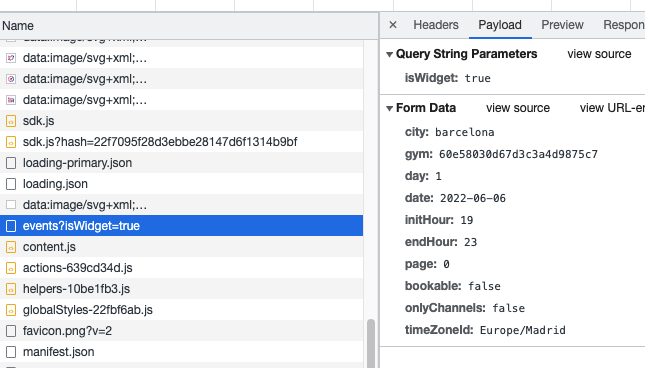
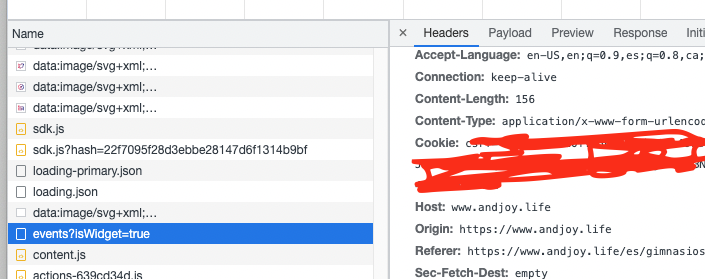
<p>Using andjoy via web I realized there is an API I could call to book the classes.</p>

<p><img src="/images/andjoy_web.png" alt="andjoy web API call example" /></p>

<p>I started playing with Postmand and quickly replicated the calls I needed. There are two:</p>

<ol>
  <li><code class="language-plaintext highlighter-rouge">events</code> - <code class="language-plaintext highlighter-rouge">POST</code> - Will give me the events for a given day and time frame.</li>
  <li><code class="language-plaintext highlighter-rouge">bookings/book</code> - <code class="language-plaintext highlighter-rouge">POST</code> - With the event Id retrieved in the previous call, I will do the booking</li>
</ol>

<p>Knowing which calls to do, next step how can I run them automatically? I quickly thought about a node script in Gitlab.</p>

<p>Why? Node scripts allow to make API calls easily and Gitlab has scheduled builds that work really well in my experience.</p>

<h2 id="the-script">The script</h2>

<p>I uploaded the script to a repo: <a href="https://gitlab.com/jpallares/andjoy-autbook-class">andjoy autobook class</a>. I’m not winning any naming contests. To make it work you have to initialize the env variables with the corresponding values. Being the Cookie the most important, otherwise you won’t have access rights.</p>

<p>To retrieve it look in your browser network traffic when using AndJoy via web.</p>

<p><img src="/images/andjoy_cookie.png" alt="andjoy cookie example" /></p>

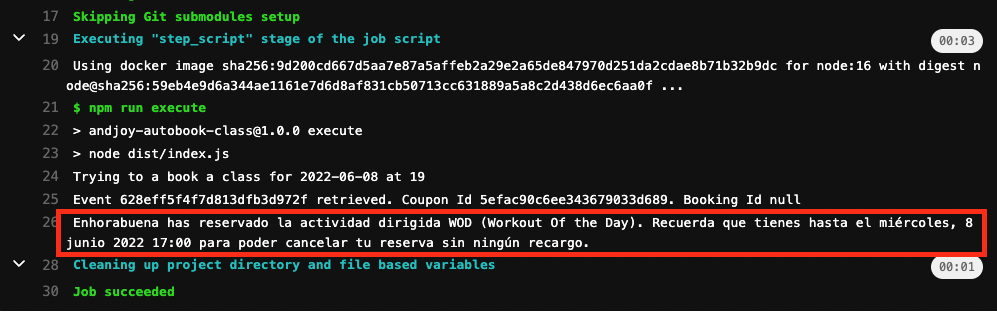
<p>Finally, let me show you and example of a successful booking:</p>

<p><img src="/images/gitlab_andjoy.png" alt="gitlab successful build" /></p>

<p>I hope you enjoy it and I hope you don’t go to the same crossfit gym as me 😃</p>]]></content><author><name>Juan Pallarès</name><email>juan@pallares.me</email></author><category term="node" /><category term="andjoy" /><category term="fitness" /><category term="class" /><category term="crossfit" /><summary type="html"><![CDATA[When going to crossfit in the "rush hour" you only have a small time frame to book the class. In 30 minutes all the slots can be full and you can't go anymore. With this script you will book all the classes you need automatically.]]></summary></entry><entry xml:lang="en"><title type="html">Google Suite will stop being free. How to have free custom domain email with forwarding</title><link href="https://juan.pallares.me/google-suite-no-longer-How-to-have-custom-domain-email-with-forwarding/" rel="alternate" type="text/html" title="Google Suite will stop being free. How to have free custom domain email with forwarding" /><published>2022-02-12T00:00:00+01:00</published><updated>2022-02-12T00:00:00+01:00</updated><id>https://juan.pallares.me/google-suite-no-longer-How-to-have-custom-domain-email-with-forwarding</id><content type="html" xml:base="https://juan.pallares.me/google-suite-no-longer-How-to-have-custom-domain-email-with-forwarding/"><![CDATA[<p>Back in 2013, as the typical early adopter, I got a free Google Suite account for my pallares.me domain. I never used it deeply, but I created a juan@pallares.me email that I still keep as my main one. I forwarded the emails to my personal account and I could send email as “juan@pallares.me” too.</p>

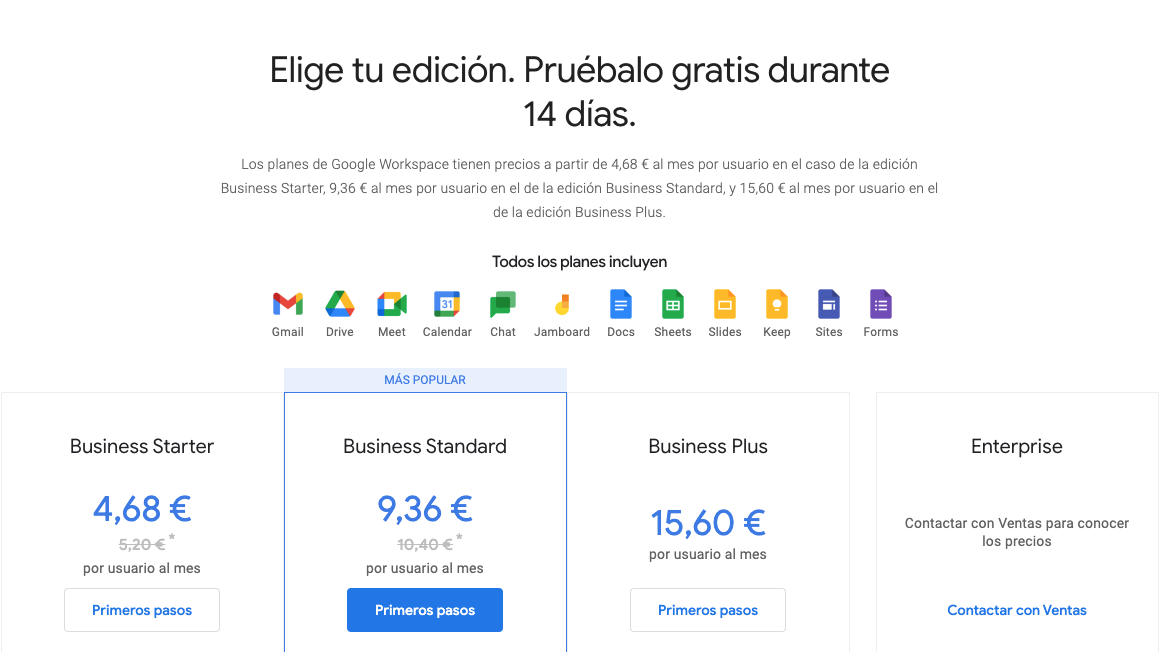
<p>Well, Google did it again. They are migrating the G Suite to Workspace and the free option is going to disappear (remember Google Photos?). So I started looking for alternatives.</p>

<p><img src="/images/Gsuitepricing.png" alt="Google Suite Workspace Pricing" /></p>

<h2 id="zoho">Zoho</h2>

<p>One good candidate was <a href="https://www.zoho.com/es-xl/">Zoho</a>, it allows you to have custom domain free email. Only problem, once I had everything set up I noticed that in order to forward email to another account you have to pay extra. This is a no-go, I want to keep using Gmail.</p>

<h2 id="forwardemailnet">forwardemail.net</h2>

<p>I was seeing myself paying to have my email forwarded when I found <a href="https://forwardemail.net/">forwardemail</a>. This is a super basic service, there is no inbox or anything for your email, you just configure it and everything will be forwarded. Of course you can also configure “Send email as”. Just what I needed!</p>

<p>Do you have a professional and personal email accounts? have you considered using a custom domain?</p>]]></content><author><name>Juan Pallarès</name><email>juan@pallares.me</email></author><category term="google" /><category term="suite" /><category term="gsuite" /><category term="free" /><category term="email" /><category term="custom" /><category term="domain" /><category term="forwardemail" /><summary type="html"><![CDATA[forwardemail.net allows you to forward your custom domain email to another email account. Fast and easy.]]></summary></entry><entry xml:lang="en"><title type="html">How to create a Github profile README</title><link href="https://juan.pallares.me/how-to-create-a-github-profile-README/" rel="alternate" type="text/html" title="How to create a Github profile README" /><published>2022-01-09T00:00:00+01:00</published><updated>2022-01-09T00:00:00+01:00</updated><id>https://juan.pallares.me/how-to-create-a-github-profile-README</id><content type="html" xml:base="https://juan.pallares.me/how-to-create-a-github-profile-README/"><![CDATA[<p>Github has a cool functionality, if you upload a repo with the same name as your profile, the README of that repo will be shown as profile. <a href="https://github.com/jpallares">Example with my Github profile</a>. <a href="https://github.com/jpallares/jpallares">The repo</a>.</p>

<h2 id="the-basic-version">The basic version</h2>

<p>You can just set some text, a couple emojis and links. You will have a better profile than most of the people.</p>

<p><img src="/images/basic_profile.png" alt="Basic profile" /></p>

<h2 id="-show-latest-blog-posts">📖 Show latest blog posts</h2>

<p>If you have a blog, it won’t hurt to show your latest posts.</p>

<p><img src="/images/github_blogposts.png" alt="Github blog posts" /></p>

<p>But updating the README everytime you add a post? No! Are you crazy? Github Actions have you covered. It can check periodically for new posts and uptate your README accordingly. To create the Github action you need to create a file in the following path <code class="language-plaintext highlighter-rouge">.github/workflows/blog-post-workflow.yml</code>. <a href="https://github.com/jpallares/jpallares/blob/main/.github/workflows/blog-post-workflow.yml">The contents</a> in my case are the following:</p>

<div class="language-yml highlighter-rouge"><div class="highlight"><pre class="highlight"><code><span class="na">name</span><span class="pi">:</span> <span class="s">Blog Posts</span>

<span class="na">on</span><span class="pi">:</span>
  <span class="c1"># Run workflow automatically</span>
  <span class="na">schedule</span><span class="pi">:</span>
    <span class="c1"># Runs every hour, on the hour</span>
    <span class="pi">-</span> <span class="na">cron</span><span class="pi">:</span> <span class="s2">"</span><span class="s">0</span><span class="nv"> </span><span class="s">*</span><span class="nv"> </span><span class="s">*</span><span class="nv"> </span><span class="s">*</span><span class="nv"> </span><span class="s">*"</span>

<span class="na">jobs</span><span class="pi">:</span>
  <span class="na">update-readme-with-blog</span><span class="pi">:</span>
    <span class="na">name</span><span class="pi">:</span> <span class="s">Update this repo's README with latest blog posts</span>
    <span class="na">runs-on</span><span class="pi">:</span> <span class="s">ubuntu-latest</span>
    <span class="na">steps</span><span class="pi">:</span>
      <span class="pi">-</span> <span class="na">uses</span><span class="pi">:</span> <span class="s">actions/checkout@v2</span>
      <span class="pi">-</span> <span class="na">uses</span><span class="pi">:</span> <span class="s">gautamkrishnar/blog-post-workflow@master</span>
        <span class="na">with</span><span class="pi">:</span>
          <span class="c1"># comma-separated list of RSS feed urls</span>
          <span class="na">feed_list</span><span class="pi">:</span> <span class="s2">"</span><span class="s">https://juan.pallares.me/feed.xml"</span>
</code></pre></div></div>
<p>First the schedule is configured. With this configuration the workflow will check every hour for new posts. 
Then we use an action that simply needs the blog feed to check. See how I use the public workflow from <a href="https://github.com/gautamkrishnar">gautamkrishnar</a>. His profile is worth checking.</p>

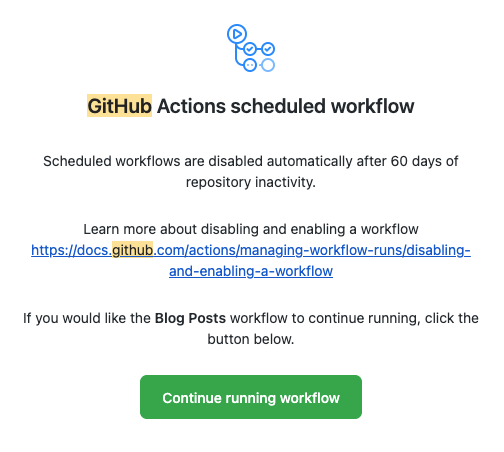
<p>As a plus, I noticed that if the workflow does not detect changes in 60 days, it’s disabled. Github emails you an alarm. Nice reminder to keep writing posts in the blog 😄.</p>

<p><img src="/images/github_workflow_reminder.png" alt="Github workflow emakil remainder" /></p>

<h2 id="-show-github-stats">📈 Show Github stats</h2>

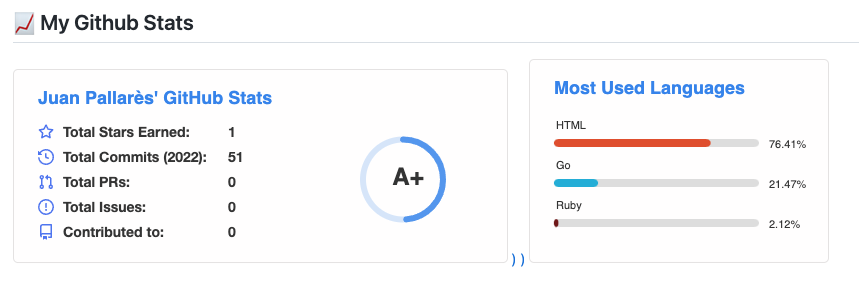
<p>Finally, you can also add some cool stats about your Github usage. Since professionally I use a private Gitlab, <a href="https://github.com/jpallares#-my-github-stats">my stats are not impressive</a>.</p>

<p><img src="/images/github_stats.png" alt="Github Stats" /></p>

<p>In my case I just needed to add a couple lines directly in the README file</p>

<div class="language-markdown highlighter-rouge"><div class="highlight"><pre class="highlight"><code><span class="p">[</span><span class="nv">![My GitHub stats</span><span class="p">](</span><span class="sx">https://github-readme-stats.vercel.app/api?username=jpallares&amp;count_private=true&amp;show_icons=true</span><span class="p">)</span>))](https://github.com/anuraghazra/github-readme-stats)
<span class="p">[</span><span class="nv">![Top Langs</span><span class="p">](</span><span class="sx">https://github-readme-stats.vercel.app/api/top-langs/?username=jpallares</span><span class="p">)</span>](https://github.com/anuraghazra/github-readme-stats)
</code></pre></div></div>

<p>Notice how I set my github profile id (jpallares) as username. Check <a href="https://github.com/anuraghazra/github-readme-stats">anuraghazra github</a> for more details.</p>

<p>Ready for showing off some cool stats?</p>]]></content><author><name>Juan Pallarès</name><email>juan@pallares.me</email></author><category term="github" /><category term="profile" /><category term="code" /><category term="development" /><category term="coding" /><category term="posts" /><category term="blog" /><category term="actions" /><summary type="html"><![CDATA[Create a Github profile with cool graphics and latests blog posts]]></summary></entry></feed>